-1.png?width=240&height=100&name=Heading%20(2)-1.png)
Item Statuses
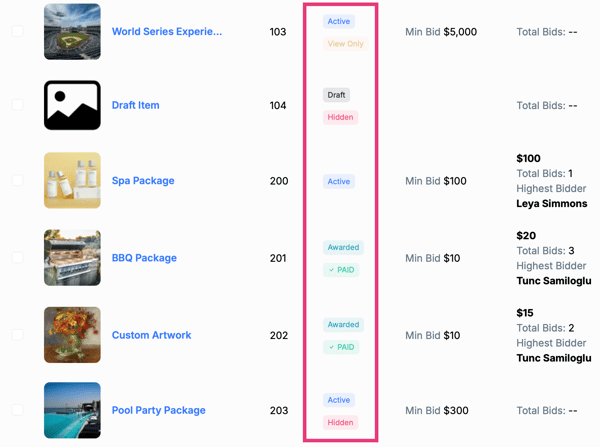
Draft
Draft items are not visible to bidders.
These items are still being created or edited and have not been activated.
Common use cases:
-
Building items ahead of time
-
Items missing required details and not ready yet
Active
Active items are live in the auction.
Depending on access settings, bidders may be able to view, bid, or purchase the item.
Common use cases:
-
Silent or online auction items currently open
-
Items ready for bidder interaction
- Live auction items available for viewing ahead of or during the event
Put on Hold
Items placed On Hold are temporarily inactive.
They remain in the system but cannot receive bids.
Common use cases:
-
Removing an item from bidding without deleting it
-
Pausing bidding due to an issue
Awarded
Awarded items have been assigned to a winning bidder.
This status typically appears after the auction has closed or an admin manually awards the item.
Paid
The Paid indicator appears once the winning bidder has completed checkout.
This confirms payment has been successfully processed.
Common use cases:
-
Tracking fulfilled auction items
-
Verifying completed transactions
Access Options
Access options control what bidders can do with an item while it is Active.
Hidden
Hidden items are not visible to bidders at all.
Admins can still view and manage these items.
Best for:
-
Items not ready to display
-
Items reserved for later release
View Only
View Only items are visible to bidders but cannot be bid on or purchased.
Best for:
-
Previewing items before bidding opens
-
Displaying live auction items ahead of time
Can Bid or Purchase
Items marked Can Bid or Purchase allow bidders to place bids or complete a direct purchase (if enabled).
Best for:
-
Silent auction items
-
Buy Now items
Bulk Item Actions
Admins can manage multiple items at once using bulk actions, including:
-
Activate Items
-
Put on Hold
-
Mark items as Hidden, View Only, or Can Bid or Purchase
-
Bulk Edit selected items
-
Print Item Cards or Bid Sheets
-
Delete selected items
These tools make it easy to manage large auctions efficiently.
Need Additional Help?
We're here to assist you in any way we can. Don't hesitate to reach out to support@betterunite.com
Let's go do some good.