-1.png?width=240&height=100&name=Heading%20(2)-1.png)
Auction reports in BetterUnite provide detailed insights into bidding activity, item performance, winners, and payments for auctions associated with an Event Campaign or Online Auction Only. These reports help organizers reconcile sales, track bidder engagement, and prepare post-event follow-up or accounting.
This article explains where to find auction reports and provides a brief overview of what each report includes.
To access auction reports:
-
Log in to your BetterUnite admin dashboard.
-
Navigate to your and select your Auction or Event Campaign
- Make sure you are on the campaign dashboard.
-
Click on Reports on the left-hand side
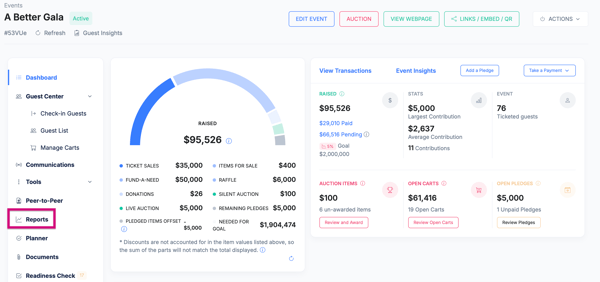
From here, you can view, download, or export multiple auction-specific reports.
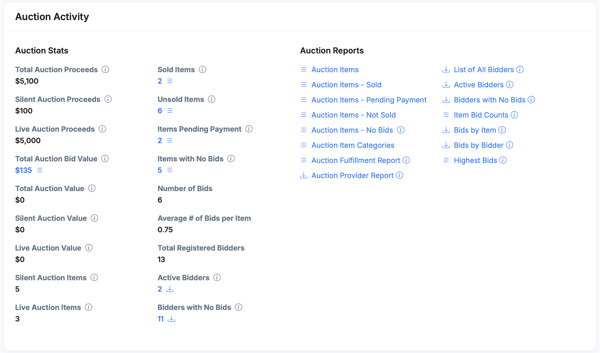
Auction Item Report
Provides a detailed list of all auction items included in the event.
Typically includes:
-
Item name and item number
-
Item category (if applicable)
-
Starting bid and bid increment
-
Fair market value (FMV)
-
Buy It Now price (if enabled)
-
Final bid amount
-
Auction status (sold, unsold, closed)
This report is useful for evaluating item performance and determining which items generated the most interest or revenue.
Bid History Report
Shows every bid placed during the auction.
Typically includes:
-
Item name
-
Bidder name
-
Bid amount
-
Date and time of each bid
-
Whether the bid was the winning bid
This report is helpful for resolving bid disputes and reviewing bidding activity.
Winning Bidders Report
Summarizes all auction winners and the items they won.
Typically includes:
-
Winner name and contact information
-
Item won
-
Winning bid amount
-
Total amount owed
This report is commonly used for fulfillment, checkout follow-up, and donor communication after the event.
Payments / Auction Sales Report
Provides financial details related to auction purchases.
Typically includes:
-
Winning bidder
-
Item(s) purchased
-
Amount paid
-
Payment status (paid, unpaid, refunded)
-
Transaction date
This report is useful for reconciliation and confirming which auction purchases have been successfully completed.
Unsold Items Report (if applicable)
Lists auction items that did not receive any bids or did not meet minimum requirements.
Typically includes:
-
Item name
-
Starting bid
-
Category
-
Auction status
This report can help with post-event outreach or reusing items in future auctions.
Exporting and Using Reports
Most auction reports can be:
-
Viewed directly in BetterUnite
-
Exported as a file (such as CSV or Excel)
Reports reflect real-time data and may update as payments are completed or reconciled.
Tips
-
Run auction reports after checkout closes for the most accurate totals.
-
Use the Winning Bidders and Payments reports together to confirm fulfillment status.
-
Auction reports are specific to each Event Campaign and do not combine data across campaigns.
Need Additional Help?
We're here to assist you in any way we can. Don't hesitate to reach out to support@betterunite.com
Let's go do some good.