-1.png?width=240&height=100&name=Heading%20(2)-1.png)
Exporting payout data from BetterUnite is an important step in maintaining accurate financial records. By downloading this information, you can reconcile your bank deposits with individual transactions, keep your accounting system aligned with actual activity, and clearly see the net revenue (after fees) for each event or campaign. This practice supports cleaner books, more reliable reporting, and quicker resolution of donor or transaction-related inquiries.
To access the Payout section within BetterUnite, begin by navigating to
- Settings -> Payment Processors
- Under Funding Setup, choose the Stripe account from which you would like to export the payout, and then click View.
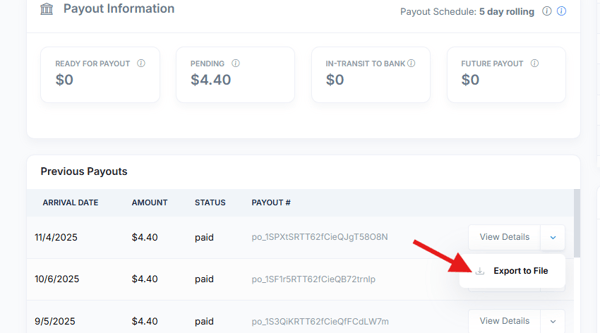
- On the Payout Information page, locate the Previous Payout section, select the specific payout you want to export, then open the View Details dropdown and choose Export to File.
Need Additional Help?
We're here to assist you in any way we can. Don't hesitate to reach out to support@betterunite.com
Let's go do some good.