-1.png?width=240&height=100&name=Heading%20(2)-1.png)
BetterUnite’s Bidder Registration feature makes it easy to include supporters who cannot attend your event in person. By enabling bidder registration, you allow online-only bidders to register, save a payment method, and participate in your auction from anywhere—without purchasing a ticket.
This article explains when to turn on bidder registration, how to set it up, and what the registration experience looks like for non-ticketed bidders.
When to Use Bidder Registration
Bidder Registration should be enabled when you want to:
-
Allow supporters who are not attending your event to bid in your auction
-
Open your online or silent auction to a wider audience
- Best Practice: Turn on Bidder Registration Options at the same time you activate your auction for viewing and/or bidding so online bidders can register as soon as items are available.
How to Enable Bidder Registration
-
Navigate to your Event Campaign
-
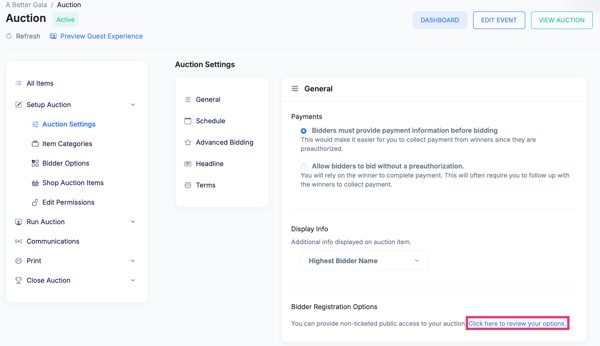
Open the Auction and go to Auction Settings
-
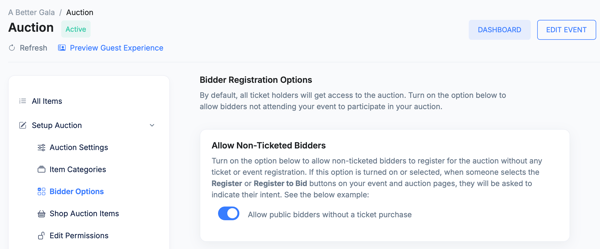
Enable the Allow Non-Ticketed Bidders Bidder Registration option
-
Save your changes
OR
-
Navigate to your Event Campaign
-
Open Edit Event>Tickets
- Toggle on Allow Non-Ticketed Bidders option
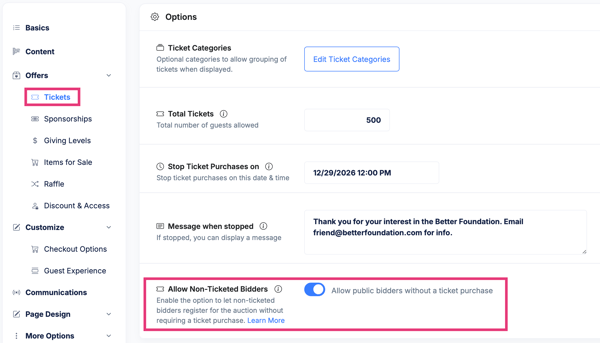
Once enabled, BetterUnite will allow anyone to register as a bidder even if they do not have an event ticket.
When to Turn Bidder Registration On
Bidder Registration should be turned on after your auction has been activated:
-
When the auction is set to View Only, supporters can browse items and register early
-
When bidding is opened, registered bidders can immediately place bids
What the Registration Process Looks Like for Online-Only Bidders
For supporters who are not ticketed attendees, the process is simple:
-
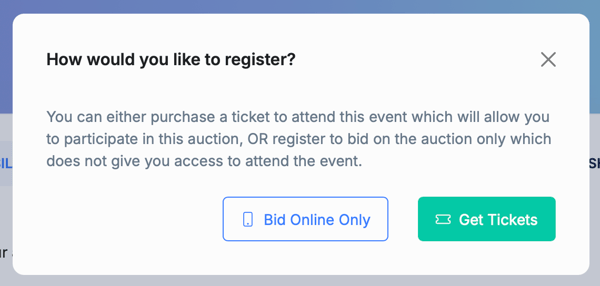
The bidder clicks either the Register button on the Main Campaign page OR they select Register to Bid on the Auction Page and this pop-up appears
-
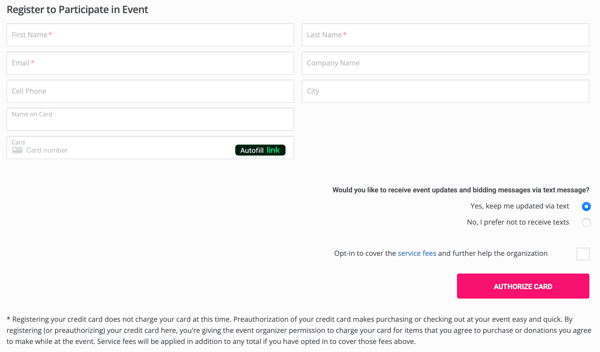
If they select Bid Online Only they are asked to enter their contact information (If they select Get Tickets, they are taken to your checkout page.)
-
They securely save a payment method (depending on your auction settings)
After Registration: Personal Bidding Page
Once registration is complete:
-
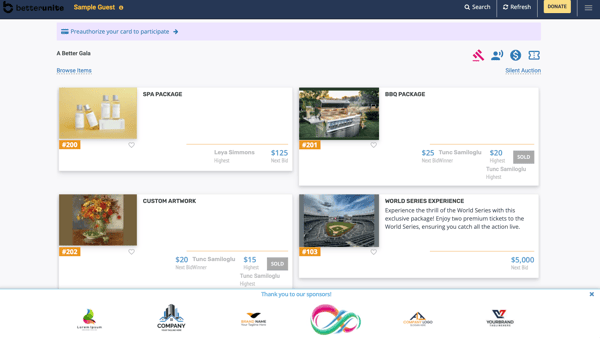
The bidder is automatically redirected to their personal bidding page, also known as their Guest Experience Link
-
They can:
-
View all auction items
-
Place and manage bids
-
Track items they are winning or watching
- Make donations
-
This personalized experience makes it easy for online-only bidders to stay engaged throughout the auction.
Key Benefits of Using Bidder Registration
-
Expands your auction audience beyond event attendees
-
Increases participation and overall bidding activity
-
Creates a seamless, self-guided experience for remote bidders
Summary
By enabling Bidder Registration, you can open your auction to online-only supporters while maintaining a smooth, secure bidding experience. Turning it on when your auction goes live allows bidders to register early, bid confidently, and seamlessly access their personal bidding page and helping you maximize participation and auction revenue.
Need Additional Help?
We're here to assist you in any way we can. Don't hesitate to reach out to support@betterunite.com
Let's go do some good.