-1.png?width=240&height=100&name=Heading%20(2)-1.png)
Note: Activity pledges (pledges tied to a specific peer-to-peer activity) are different from standard campaign pledges. Both types now support bulk deletion.
How to Bulk Delete or Cancel Pledges
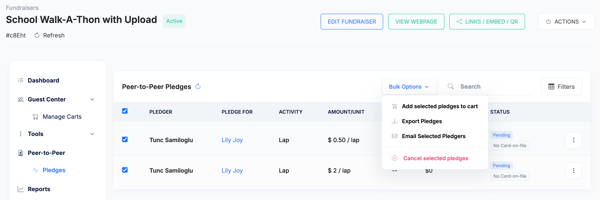
- Navigate to your campaign's Dashboard, select Peer to Peer>Pledges. This will only appear if you have Activity Pledges already
- Filter or browse to find the pledges you want to remove.
- Select one or more pledges using the checkboxes.
- Click Cancel from the bulk action menu.
- Confirm the action when prompted.
Frequently Asked Questions
Do pledgers get notified when their pledge is canceled?
Pledgers are not automatically notified. If you want to inform them, send a message using the Message Pledgers feature before deleting or canceling.
Are fulfilled (paid) pledges eligible for deletion?
Pledges that have been paid are generally not eligible for deletion through this flow. Contact support if you need to remove a paid pledge record.
Need Additional Help?
We’re here to assist you in any way we can. Don’t hesitate to reach out to support@betterunite.com
Let’s go do some good.