-1.png?width=240&height=100&name=Heading%20(2)-1.png)
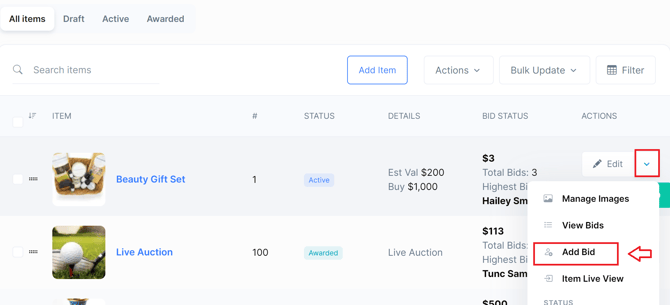
- Navigate to the Auction Page.
- Locate the Auction Item you wish to bid on by either scrolling or using the search bar.
- Click on the drop down menu for the specific item, this button is located next to the Edit button.
- Select the Add Bid option as seen below.
Looking Up a Bidder
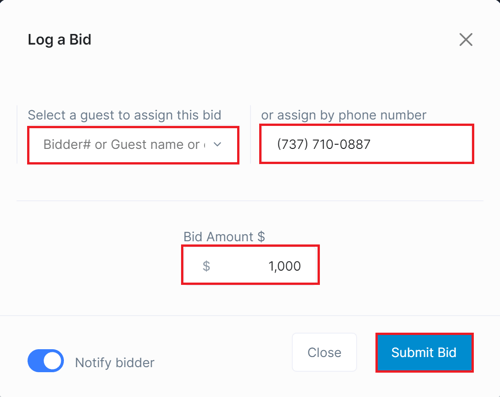
When submitting a bid on someone’s behalf, you can quickly locate the bidder using:
-
Bidder name
-
Bidder number
-
Phone number
This makes it easy to find the correct participant, even during busy live or silent auctions.
Payment Information Requirement (Bid Gating)
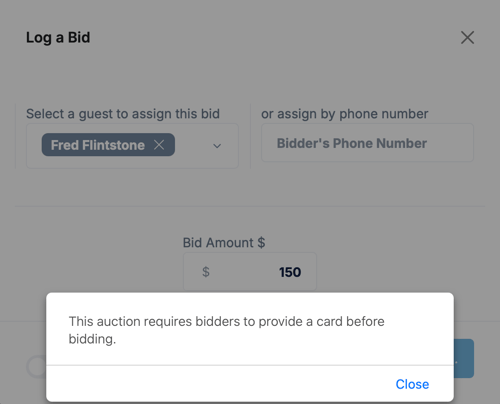
If your auction is configured with the setting “Must provide payment information before bidding”, admins will not be able to submit a bid for bidders who have not yet added a payment method.
-
If the bidder has payment information on file, the admin can submit the bid successfully.
-
If the bidder does not have payment information, the system will prevent the bid from being placed until the bidder completes that step.
This setting helps ensure smoother checkout and reduces unpaid auction items.
Best Practices
- To avoid delays during live bidding, encourage bidders to preauthorize their payment method before the auction begins.
- Keep all communication clear and documented when bidding on behalf of someone else.
- Keep an eye on the auction's progress to respond promptly if further action is needed, such as placing a higher bid.
Need Additional Help?
We're here to assist you in any way we can. Don't hesitate to reach out to support@betterunite.com
Let's go do some good.