-1.png?width=240&height=100&name=Heading%20(2)-1.png)
To send custom SMS marketing campaigns in BetterUnite, your organization needs two things: a dedicated phone number and message credits. This article walks you through setting up both from the SMS Messaging page.
Navigate to Marketing > SMS Messaging to get started.
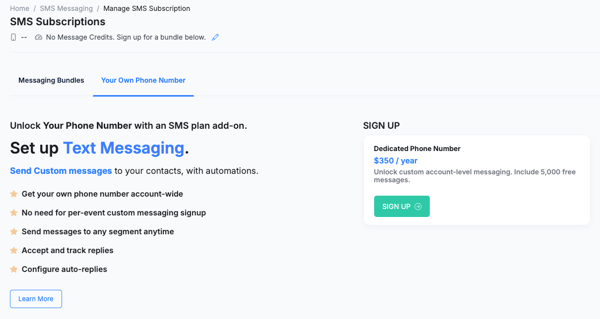
Step 1 — Claim Your Dedicated Phone Number
- From the SMS Messaging page, click Manage Subscription in the top right corner.
- On the SMS Subscriptions page, select the Your Own Phone Number tab.
- Click Sign Up to purchase your dedicated phone number. The plan is $350 / year and includes 5,000 free messages to get you started.
Your dedicated phone number is account-wide, so there is no need to set up separate messaging for each individual event. Once active, your number enables the following features:
- Send custom messages to any guest or contact segment at any time
- Accept and track replies from guests directly in BetterUnite
- Configure auto-replies for common responses
- Enable SMS steps in Workflow Automations
- No per-event signup required — use your number across all events and campaigns
Step 2 — Purchase a Message Bundle
After claiming your phone number, you will need message credits to send custom SMS campaigns. Credits are purchased in bundles and auto-renew only when your current bundle is fully used.
- From the SMS Subscriptions page, select the Messaging Bundles tab.
- Review the available bundles and select the one that fits your needs. Larger bundles include free bonus messages and a lower effective cost per message.
Custom Messaging Bundles
| Messages | Price | Free Messages Included | Effective Cost / Message |
|---|---|---|---|
| 1,000 | $59 | — | $0.059 |
| 5,000 | $220 | 1,000 free | $0.044 |
| 7,500 | $320 | 2,000 free | $0.042 |
| 10,000 | $400 | 3,000 free | $0.040 |
| 25,000 | $800 | 5,000 free | $0.032 |
* Effective cost is based on sent messages only.
- Click Purchase on the bundle you want. Credits are added to your account balance immediately and are available across all your events.
- Bundles auto-renew only when your credits are fully consumed — you will not be charged until you have used your current balance.
What Happens Next
Once your phone number is active and you have message credits, you are ready to start sending custom SMS campaigns to your any contacts with a phone number in your BetterUnite CRM. See this article for step-by-step instructions on composing and sending your first text message campaign.
For information on which messages are free and do not require credits (such as ticket confirmation texts, check-in messages, and auction bid alerts), see SMS Messages: Credits.
Frequently Asked Questions
Do I need a dedicated phone number to send automatic transactional texts to event guests?
No. Automatic messages like ticket purchase confirmations, check-in texts, and auction bid alerts are sent by the system without a dedicated number and do not require credits. The dedicated phone number is required only for custom marketing campaigns you compose and send through the marketing module.
What happens when my credits run out?
Your bundle will auto-renew at the same tier once your credits are fully consumed. You can also manually purchase a new bundle or upgrade your bundle size at any time from the SMS Subscriptions page.
Do unused credits roll over?
Yes. Credits remain on your account balance until they are used — the bundle only auto-renews when the balance reaches zero.
Can guests reply to messages sent from my number?
Yes. With a dedicated phone number, guests can reply directly and you can track those replies in BetterUnite. You can also configure auto-replies for common responses.
Need Additional Help?
We’re here to assist you in any way we can. Don’t hesitate to reach out to support@betterunite.com
Let’s go do some good.