-1.png?width=240&height=100&name=Heading%20(2)-1.png)
How to Set Up the DonorSearch Integration
The DonorSearch integration allows you to retrieve wealth and giving insights directly within your account by securely connecting your DonorSearch API key.
This guide walks you through the setup process step by step.
✅ Before You Begin
To complete this setup, you’ll need:
-
An active DonorSearch account
-
Permission to view API Keys in DonorSearch
-
Access to Settings in your account
ⓘ The integration does not consume screenings during setup. Screenings are only used when wealth data is retrieved for contacts.
Step 1: Navigate to DonorSearch Settings
-
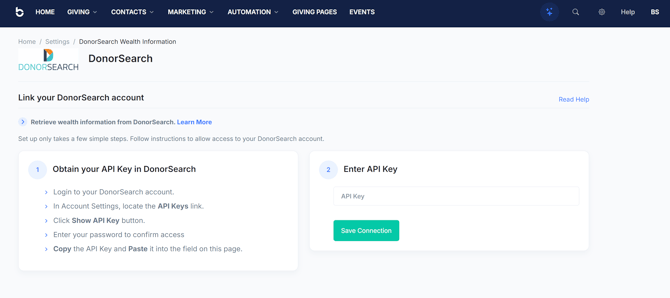
In the main navigation, go to Settings.
-
Select DonorSearch Wealth Information.
You’ll see the DonorSearch setup page with instructions for linking your account.
Step 2: Obtain Your DonorSearch API Key
-
Log in to your DonorSearch account in a separate browser tab.
-
Go to Account Settings.
-
Locate the API Keys section.
-
Click Show API Key.
-
Enter your DonorSearch password when prompted.
-
Copy the API key.
🔐 Keep your API key secure. Anyone with this key can access your DonorSearch data.
Step 3: Enter and Save Your API Key
-
Return to the DonorSearch setup page.
-
Paste your API key into the API Key field.
-
Click Save Connection.
If the key is valid, your account will be connected immediately.
Step 4: Confirm the Connection
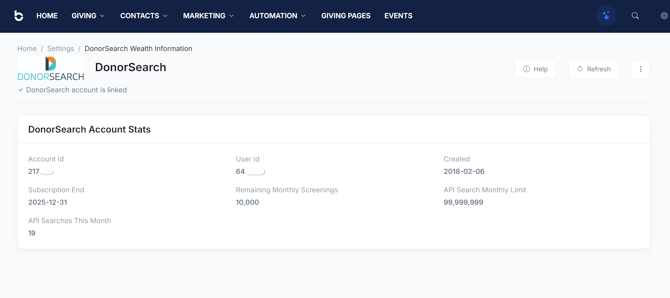
Once connected, you’ll see a confirmation message indicating that your DonorSearch account is linked.
A DonorSearch Account Stats panel will also appear, displaying information such as:
-
Account ID
-
User ID
-
Subscription end date
-
Remaining monthly screenings
-
API search usage for the current month
Query Options
You can set a time span for caching in order to manage how frequently to refresh wealth data. This setting may impact/help how many DonorSearch points you consume.
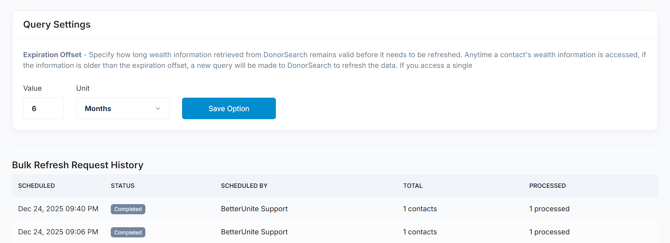
Note: the page also shows any bulk-queries you perform from the contacts page.
🎉 You’re All Set!
Your DonorSearch integration is now active. Wealth and giving insights will be available wherever DonorSearch data is supported in your account.
You can return to this page at any time to:
-
View account usage
-
Refresh connection status
-
Troubleshoot API access
❓ Troubleshooting
The API key isn’t saving
-
Double-check that you copied the full key
-
Confirm your DonorSearch subscription is active
-
Ensure you have permission to access API keys
Wealth data isn’t appearing
-
Verify you still have remaining monthly screenings
-
Check that the contact meets DonorSearch matching requirements
If issues persist, contact support or click Help on the DonorSearch settings page.
Need More Help?
Visit the DonorSearch Help Center or reach out to your DonorSearch account representative for questions about API access, limits, or data coverage.