-1.png?width=240&height=100&name=Heading%20(2)-1.png)
Available on Membership Pro plans.
Global Communications lets you reach all your members at once — without touching individual records. From the Membership Center, you can post a note that appears in every member's portal Messages tab, trigger a banner alert that appears on their dashboard, or add a benefit to every member on a specific plan. This is useful for announcements, reminders, policy updates, or rolling out new perks to your entire membership base in a single action.
Where to Find It
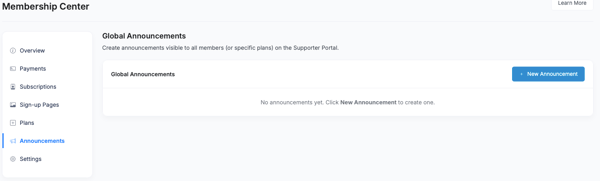
Navigate to Contacts > Membership Management. Global Communications appears in the left sidebar under Messages (or Communications).
Note: This feature is available on Membership Pro plans only. If you do not see the Global Communications option in the sidebar, confirm that your organization is on a Membership Pro plan or contact support@betterunite.com for assistance.
Sending a Global Message (Note)
A global message — also called a note — appears in each targeted member's portal under the Messages tab. Use this for non-urgent communications: policy updates, benefit announcements, welcome messages, or seasonal notes.
To send a global message:
- Click New Message or Add Note.
- Write your message in the text field.
- Choose your target audience: All members, or filter to members on a specific plan.
- Click Send or Save. The note will appear immediately in every targeted member's portal Messages tab.
How It Differs from Individual Member Messages
An individual member message — posted from the Member Detail page for a specific contact — goes to that one member only. A global message goes to all members, or all members on a specific plan, at once without requiring you to open each record individually.
For information about posting a message to a single member, see Can I post a message to a member?
Posting a Member Alert
A member alert appears as a banner on each member's Supporter Portal dashboard — more prominent and immediately visible than a message tab note. Use alerts for time-sensitive information: event reminders, renewal deadlines, urgent policy changes, or emergency notices.
To post an alert:
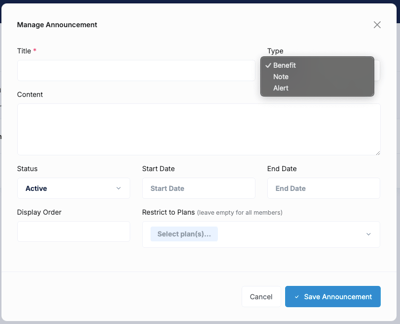
- Click New Announcement. Add the Title
- Select Alert from the Type dropdown menu
- Write the alert text. Keep it concise — alerts are designed to be brief, visible callouts.
- Set an optional expiration date if you only want the alert to display for a limited time. After the expiration date, the alert will stop appearing automatically.
- Choose your target audience: All members, or filter by plan.
- Click Post Alert. The banner will appear on the portal dashboard for all targeted members immediately.
Adding a Global Benefit
Use this to add a new benefit to every active member on a specific plan at once — no need to edit each subscription record individually. This is ideal when you are rolling out a new perk (such as a discount code, access to a new resource, or an event invitation) to an entire membership tier.
To add a global benefit:
- Click New Announcement. Add the Title
- Select Benefit from the Type dropdown menu
- Enter the benefit Title and Description.
- Choose whether the benefit is visible to members in their Supporter Portal.
- Select which plan's subscribers should receive the benefit.
- Click Save. The benefit will be added to every active subscriber on the selected plan.
Note: Adding a benefit through Global Communications adds it to existing subscriber records on that plan. To add a benefit to a plan so that all future subscribers receive it automatically at sign-up, configure it under Plan Benefits instead. See Membership Benefits for details.
Frequently Asked Questions
Can I send a global message to only one plan's members?
Yes — all three global communication types (messages, alerts, and benefits) include a plan filter, so you can target a specific membership tier rather than your entire member base. This is useful if you have multiple membership levels with different perks or communications needs.
Can members reply to a global message?
No — global messages are one-way communications from the organization to members. Members can see them in their portal Messages tab but cannot respond through the platform. For two-way communication, use your standard email tools or reach out to members directly.
Is there a history of global messages and alerts I can review?
Yes — the Global Communications section maintains a log of past messages and alerts you have sent, so you can review what was communicated and when.
Can I remove an alert once posted?
Yes — you can delete or manually expire an alert from the Global Communications section at any time. Setting an expiration date when you first post the alert is the recommended approach to prevent alerts from becoming stale without requiring a manual removal step.
Do members receive an email notification when a global message or alert is posted?
Members see messages and alerts when they log into the Supporter Portal. A separate email notification for global posts is not automatically triggered — the portal is the delivery channel for these communications. For email-based outreach to members, use the standard member notification settings or your organization's email tools.
Need Additional Help?
We're here to assist you in any way we can. Don't hesitate to reach out to support@betterunite.com
Let's go do some good.