-1.png?width=240&height=100&name=Heading%20(2)-1.png)
This article explains how to export your data from BetterUnite, including contacts, transactions, and reports.
Contacts
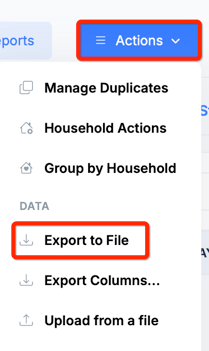
- Export your full contact list.
- How: CRM (top navigation bar) -> Contacts & Donor Management -> Actions->Export to File
Transactions
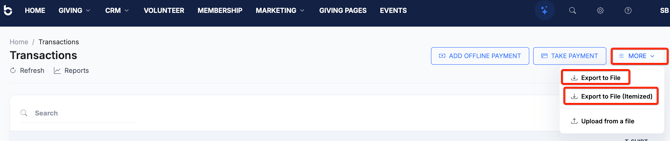
- Export a record of all past transactions.
- How: Giving (Side navigation bar) > Transactions > More > Export to File or Export to File Itemized. (Export to File exports a summary row per transaction; Export to File Itemized includes a line item for each fund/designation within a transaction.)
Reports
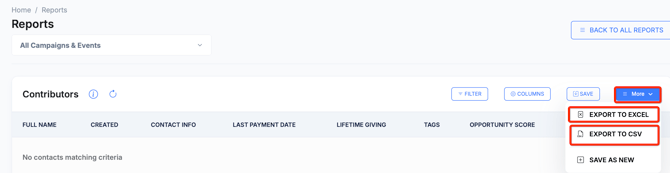
- Saved Custom Reports:
Home Page > Reports > Custom Reports > Click View on your specific custom report > More > Export to Excel or Export to CSV
-
Default Reports
Export your account's default reports from Home Page > Reports. Select the report you want, then choose your export format.
-
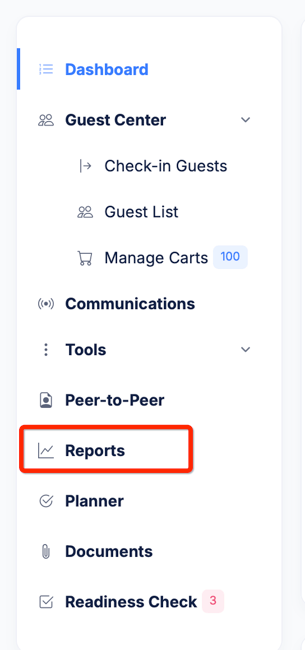
Campaign-Specific Reports
You can also export reports for individual campaigns (events, donation pages, volunteer pages, etc.). To do this, go to the specific campaign's dashboard, click Reports, then select the report(s) you'd like to export. See the example below:
Need Help?
If you have questions about exporting your data, contact us at support@betterunite.com