-1.png?width=240&height=100&name=Heading%20(2)-1.png)
Household memberships allow a single membership subscription to cover multiple members of a household under one plan and payment. The primary member — the person who signed up — can add household members from their Supporter Portal (if your organization allows self-management), and admins can always manage household members from the Membership Center. Adult household members can log in and access their own portal view.
Step 1 — Enable Household Members on a Plan
Household memberships are enabled at the plan level. For each plan where you want to allow household members, you need to turn the feature on.
- Navigate to Contacts > Membership Management > Plans.
- Edit the plan you want to update.
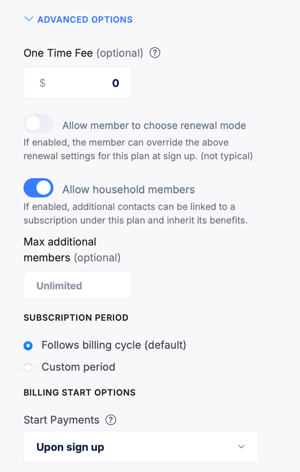
- Scroll to Advanced Options.
- Toggle on Allow Household Members.
- Optionally, set a maximum number of household members to prevent an unlimited number of additions (for example, a limit of 5 household members per subscription).
- Save the plan.
Members who are subscribed to this plan will now see a Household Members section in their Supporter Portal once the feature is enabled.
Step 2 — Adding Household Members (Primary Member)
Once a plan allows household members, the primary member can add household members from their Supporter Portal.
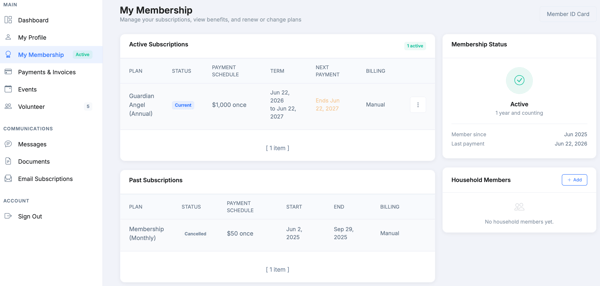
- The primary member logs in at betterunite.com/portal and navigates to My Membership.
- They will see a Household Members section listing any existing household members and an Add Member button.
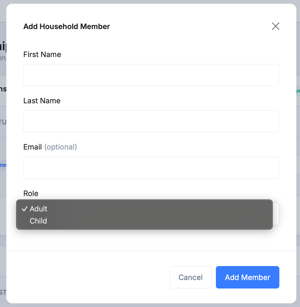
- Clicking Add Member opens a form with fields for first name, last name, email (optional), and role (Adult or Child).
Please note: Whether the primary member can add and remove household members from the portal is controlled by an org-level setting. If your organization has disabled member household management, the Household Members section will be visible but only an admin will be able to make changes.
Adult vs. Child Household Members
- When adding a household member, the primary member selects whether the member is an Adult or a Child.
- Adult household members are recognized as members of the organization and can log into their own Supporter Portal. When they log in, they will see their membership status and benefits. Adults do not see the primary member’s payment history or billing details — and they cannot add or remove other household members; that is the primary member’s role.
- Child household members are recognized as members for benefit and tracking purposes, but they cannot log into the Supporter Portal independently. Their membership is managed by the primary member.
Household Member Portal Experience (Adult)
- Adult household members access the portal the same way any member does — by going to betterunite.com/portal and verifying via email.
- They will see their membership status, any benefits associated with the plan, and their own profile information.
- Adult household members do not see payment details or the primary member’s full account information. The primary member remains the account holder responsible for billing.
Admin View of Household Subscriptions
- From Membership Management > Subscriptions, household subscriptions appear with the primary member’s name.
- Clicking into the subscription detail shows the primary member’s payment and billing information as well as the household member list. Each household member row shows their name, role (Adult or Child), and the date they were added.
- Admins can add an existing contact as a household member directly from the subscription detail page, assigning their role at the time of addition. Admins can also remove household members at any time regardless of portal settings.
Notification settings for household memberships can be configured in Membership Management > Settings. You can choose to notify adult household members about upcoming renewals alongside the primary member.
Notifications for Household Members
When a household member is added or removed
- When a household member is added to a subscription, the added person receives a system email confirming they have been added to the household membership.
- When a household member is removed, the removed person receives a system email confirming they have been removed and that any inherited benefits have ended.
- These notifications are sent automatically and cannot be suppressed.
Renewal reminders
- By default, renewal reminder emails go to the primary member only. You can enable an option to also send renewal reminders to adult household members so they are aware of the upcoming renewal.
- This setting is found in Membership Management > Settings > Notifications and is labeled Also notify household adults on renewal reminders.
Frequently Asked Questions
Is there an additional cost for household members?
Household memberships operate under a single subscription — the primary member’s plan and billing amount covers all household members. There is no per-member add-on fee within the subscription, though your plan configuration determines what is included. If you want to charge an additional amount per household member, configure a setup fee or custom amount in your plan advanced options.
Can the primary member add and remove household members from the portal?
It depends on your organization’s settings. If member household management is enabled, the primary member can add and remove household members from the Household Members section of their Supporter Portal. If this setting is turned off, the Household Members section is still visible but only an admin can make changes from the Membership Center.
What happens to household members if the primary member cancels their subscription?
If the primary member’s subscription is cancelled or expires, household members linked to that subscription will also lose their membership status.
Can a household member have their own independent membership?
Yes. An adult household member can sign up independently for their own membership through a sign-up page. That creates a separate subscription for them as the primary member.
Can I see household member benefits separately?
Benefits associated with the plan are attached to the primary subscription and visible to all household members through their portal. Individual benefit tracking per household member is managed under the primary subscription in the admin view.
Is there a limit to how many household members can be added?
Yes, you can set a maximum when enabling the feature on your plan. For example, you could allow up to 4 or 5 household members. If no limit is set, there is no cap.
Can children log into the portal?
No. Child household members are recognized as members for tracking and benefit purposes, but they do not have individual portal access. Only adult household members can log in independently.
Will the person I add as a household member receive an email?
Yes. When a household member is added, they automatically receive a system email confirming they have been added to the household membership. When they are removed, they receive a system email confirming removal and noting that any inherited benefits have ended.
Can an adult household member manage other household members from their portal?
No. Adult household members can see the household member list in their portal view, but they cannot add or remove members. Only the primary subscription owner can manage household members from the portal (if your org allows it).
Need Additional Help?
We’re here to assist you in any way we can. Don’t hesitate to reach out to support@betterunite.com
Let’s go do some good.