-1.png?width=240&height=100&name=Heading%20(2)-1.png)
If you want a membership subscription to remain active through its current term but not renew again, you can stop the subscription from renewing. This is different from canceling a subscription immediately and is commonly used when a member chooses not to continue after their current period ends.
Stopping renewal prevents any future recurring payments while allowing the member to retain access until the subscription end date.
What does “Stop Renewal” mean?
When you stop a subscription from renewing:
-
No additional recurring payments will be created
-
The subscription remains active until the next payment/end date
-
Once the end date is reached, the subscription moves to Completed status
-
Past payments and history remain unchanged
This is ideal when a member wants to finish their current membership term without renewing.
How to stop a subscription from renewing
Step 1: Locate the subscription
-
Go to Membership Management
-
Find the subscription you want to update
-
Click the subscription to open the subscription details page
Step 2: Open the Actions menu
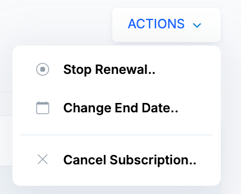
On the subscription details page, locate the Actions dropdown in the top-right area.
The Actions menu includes options such as:
-
Stop Renewal
-
Change End Date
-
Cancel Subscription
Step 3: Select “Stop Renewal”
-
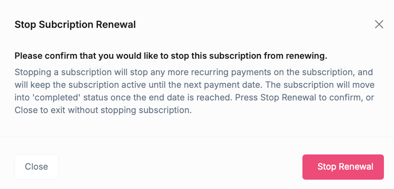
From the Actions menu, click Stop Renewal
-
Review the confirmation message explaining what will happen
-
Click Stop Renewal to confirm, or Close to exit without making changes
What happens after stopping renewal?
After confirmation:
-
The subscription will no longer generate future recurring payments
-
The current subscription period continues uninterrupted
-
The subscription automatically completes when the end date is reached
-
The member’s subscription history remains fully intact
Stop renewal vs. cancel subscription
| Action | Result |
|---|---|
| Stop Renewal | Subscription stays active until the end date, then completes |
| Cancel Subscription | Subscription ends immediately and stops access |
Use Stop Renewal when a member wants to keep benefits until their current term ends.
Troubleshooting
-
I don’t see “Stop Renewal”
The subscription may already be stopped, completed, or canceled. -
I stopped renewal by mistake
You can create a new subscription for the member if they decide to continue.