
You can track subscription payment status in two places: on an individual member's Contact page, or across all subscriptions via Membership Management. Both locations show whether each subscription is current, past due, or failing.
Contact pageWhen a supporter signs up for a membership plan, they become a subscriber. BetterUnite creates a subscription record and updates it automatically as recurring payments are processed. Each subscription record appears on the member's contact page, displaying a clear status of whether their payments are current or past due.
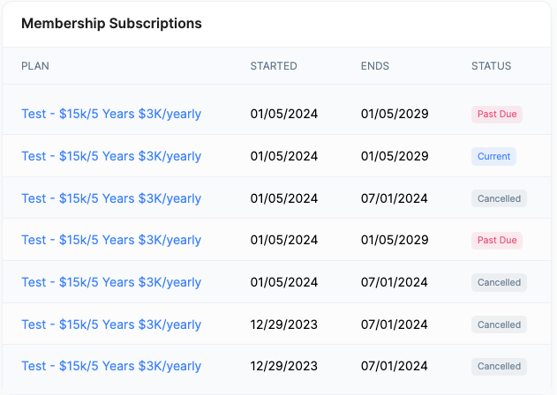
To view all past-due or failing subscriptions, follow these steps:
- Click Contacts in the top navigation menu and select Membership Management.
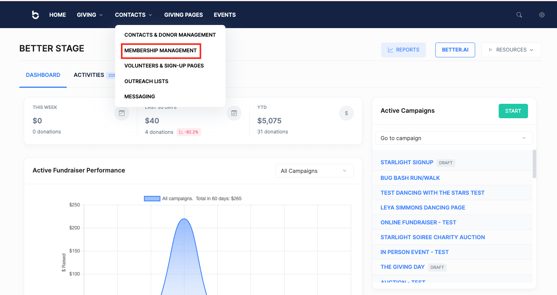
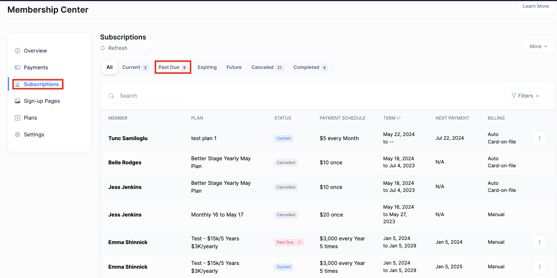
- On the Membership Management page, locate the tabs near the top of the page and click Subscriptions.
- Filter by status to view all subscriptions and their payment status, including any that are past due or failing. Available status filters include Current, Past Due, and Failing.
Need additional help?
Any additional questions? Reach out to our team at support@betterunite.com
Let's go do some good.