-1.png?width=240&height=100&name=Heading%20(2)-1.png)
Cryptocurrency is one of the fastest-growing sources of charitable giving in the United States and donors who give crypto tend to give significantly more than those using traditional payment methods. BetterUnite's new crypto donation integration, powered by EasyCrypto by DonateStock, lets your donors make a cryptocurrency gift directly from your fundraising page in just a few minutes, without you ever having to touch or hold crypto yourself.
This article walks you through how crypto giving works on BetterUnite, what your donors will see, and how you'll receive and reconcile donations in your dashboard.
To get started, please go to Settings -> Integrations -> Donate Stock in your BetterUnite account.
Why crypto giving matters for your nonprofit
Crypto represents a meaningful and largely untapped funding opportunity:
- 10% of U.S. households own some form of cryptocurrency.
- Millennials are the most common crypto owners, making up 57% of owners a generation that is increasingly driving nonprofit giving.
- Crypto donations averaged $10,000 in 2024, far exceeding average cash gift amounts.
- Like stock donations, crypto offers tax advantages for donors who give appreciated assets directly, potentially encouraging larger gifts.
- Pro-crypto legislation continues to grow, making the environment increasingly favorable for crypto philanthropy.
- Bitcoin (51.4%) and Ethereum (20.4%) are the two most commonly donated currencies, followed by Tether, XRP, and others.
The barrier has historically been complexity: nonprofits needed crypto wallets, technical infrastructure, and policies to accept and liquidate digital assets. EasyCrypto removes all of that your organization never handles crypto directly.
What EasyCrypto does for your nonprofit
EasyCrypto (by DonateStock) is the technology that powers crypto donations on BetterUnite. Here's what it enables:
- Donors can give crypto without leaving your site the entire experience happens in an embedded widget on your BetterUnite fundraising page.
- You never have to handle crypto. DonateStock receives the crypto into their 501(c)(3) account, converts it to USD, and forwards the proceeds to your nonprofit. This means crypto giving does not affect your gift acceptance policy.
- Turnkey gift processing and cash payments you receive USD, not volatile crypto assets.
- Donors receive a tax receipt automatically from DonateStock Charitable, acknowledging their gift of appreciated cryptocurrency.
- Donor information is captured so you can acknowledge and steward crypto donors just as you would any other major donor.
Pricing
EasyCrypto charges a 3.9% transaction fee (the same rate as DonateStock's stock giving product). A subscription option is also available for organizations with higher volume. There is no additional BetterUnite fee for using this integration.
The end-to-end process
Here's how a crypto donation moves from your donor through DonateStock Charitable and back to your nonprofit as cash:
- The donor initiates a gift via the EasyCrypto widget on your BetterUnite page.
- The donor's crypto is sent from their wallet to DonateStock Charitable's 501(c)(3) crypto account.
- DonateStock Charitable receives the crypto and converts it to USD.
- The USD proceeds are sent to your nonprofit, and a tax receipt is sent to the donor.
- When any DonateStock transaction is processed (DAF, Stock or Crypto), there is a messages that is sent to BetterUnite and the corresponding donation record is automatically created in your account.
Your organization receives cash you never hold, manage, or liquidate crypto yourself.
What the donor experience looks like
Below is the step-by-step experience your donors will have once they click the EasyCrypto donate button on your fundraising page.
Steps 1 & 2: Donor overview and transaction details
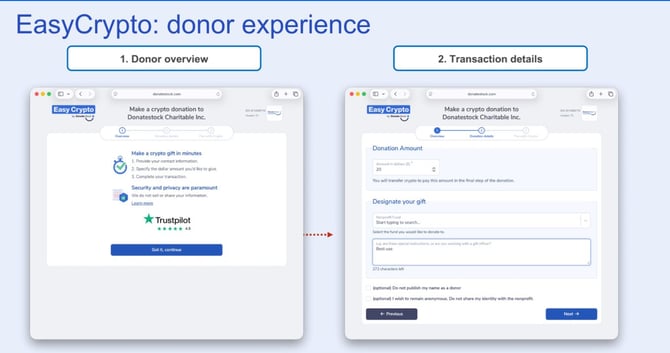
The donor clicks the crypto donate button on your page, launching the EasyCrypto widget. They first see an overview screen explaining:
- How to make a crypto gift in minutes: provide contact information, specify a dollar amount, complete the transaction.
- A privacy reassurance: DonateStock does not sell or share donor information.
- A Trustpilot rating (4.8 stars) for added confidence.
On the next screen, the donor enters:
- Donation Amount in dollars (they will transfer the equivalent crypto value in the final step).
- Nonprofit Fund designation (if applicable).
- Special instructions for the gift (optional).
- Options to remain anonymous or not have their name published as a donor.
Steps 3 & 4: Donation summary and wallet selection
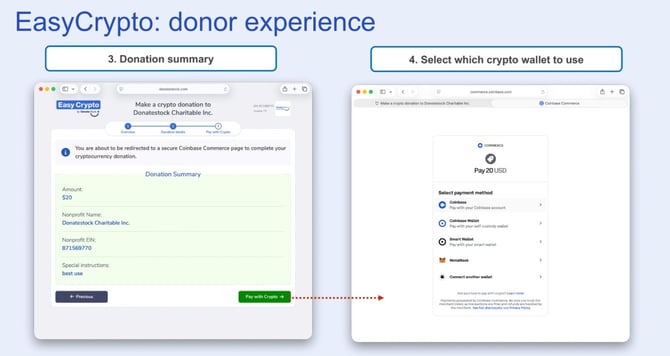
Before proceeding to payment, the donor reviews a Donation Summary showing the amount, nonprofit name, and EIN. They then click Pay with Crypto, which redirects them to a secure Coinbase Commerce page where they select their preferred payment method:
- Coinbase (pay with Coinbase account)
- Coinbase Wallet (self-custody wallet)
- Smart Wallet
- MetaMask
- Connect another wallet
Steps 5 & 6: Payment confirmation and thank you
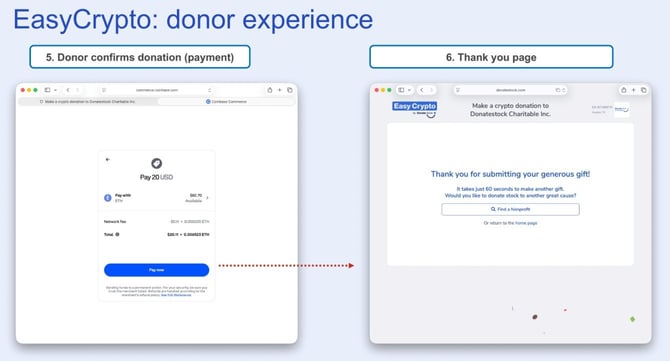
The donor confirms the transaction in their selected wallet, reviewing the crypto amount, network fee, and total. After clicking Pay now, they are returned to a thank you page confirming their gift has been submitted. The page also offers them the opportunity to donate stock or find another nonprofit to support.
Your Crypto Donations dashboard
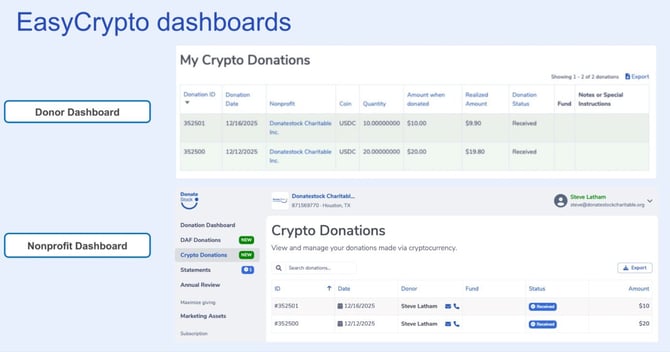
Once a donor completes a crypto gift through EasyCrypto, the donation appears in your BetterUnite admin under the new Crypto Donations section (marked NEW in your dashboard navigation alongside DAF Donations).
The Crypto Donations grid shows:
- ID the unique donation identifier
- Date when the donation was made
- Donor name with quick email/phone contact icons
- Fund the designated fund (if applicable)
- Status e.g., Received once the gift has been processed
- Amount the USD value of the crypto gift after conversion
You can search the grid and export crypto donation records using the Export button.
Donors also have their own dashboard view showing their donation history, including the coin type, quantity sent, dollar amount at time of donation, realized amount received, and donation status.
Frequently asked questions
Does my nonprofit need to set up a crypto wallet or account?
No. DonateStock Charitable receives the crypto on your behalf into their own 501(c)(3) account, converts it to USD, and sends you the cash proceeds. Your organization never holds or manages cryptocurrency directly.
Does accepting crypto affect our gift acceptance policy?
Because your nonprofit never receives or holds crypto only the cash proceeds after conversion this integration is designed specifically to avoid impacting your gift acceptance policy. We recommend confirming with your legal counsel if you have any questions, but the intent of the EasyCrypto model is that you are simply receiving a cash grant from DonateStock Charitable.
What cryptocurrencies can donors give?
The integration supports the major cryptocurrencies available through Coinbase Commerce, including Bitcoin, Ethereum, Tether (USDC), and others. The donor selects their preferred currency and wallet at checkout.
Who issues the tax receipt to the donor?
DonateStock Charitable issues the tax receipt to the donor, since the gift technically passes through their 501(c)(3) crypto account before being converted and forwarded to your nonprofit.
How long does it take to receive funds?
Processing times vary depending on blockchain network confirmation times and DonateStock Charitable's conversion and disbursement schedule. Once a donation shows a Received status in your BetterUnite dashboard, the funds are on their way to your organization.
What does this cost?
EasyCrypto charges a 3.9% transaction fee. A subscription option is available for higher-volume organizations. There is no additional BetterUnite fee for using the crypto integration.
Can donors give anonymously?
Yes. During the donation flow, donors can check options to remain anonymous or to not have their name published as a donor. Anonymous gifts will still appear in your Crypto Donations dashboard, but without identifying donor information.