-1.png?width=240&height=100&name=Heading%20(2)-1.png)
Child campaigns—also referred to as Peer-to-Peer (P2P) fundraisers—allow supporters to create individual fundraising pages connected to a parent campaign. As an admin, you can easily view, manage, and take action on these child campaigns from the main campaign.
Where to Find Child / Peer-to-Peer Campaigns
-
Navigate to the main campaign in your BetterUnite admin dashboard.
-
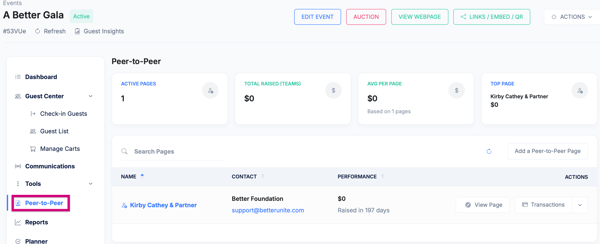
Be sure you are on the Dashboard (Not in Edit Mode) of the Main Campaign page, then select Peer-to-Peer on the left (as shown in the screenshots).
-
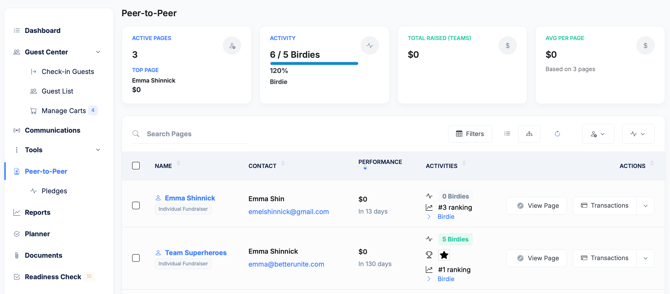
You’ll see a list of all child campaigns created under the parent campaign, including:
-
Fundraiser name
-
Owner / participant
-
Amount raised
-
Status (active, draft, disabled)
-
What You Can Do as an Admin
From this section, admins can:
-
Add a Peer-to-Peer Page (for how to on how to set up/edit, see this article.)
- Send Invitation Email to a fundraiser to create their login for external pages
- View the fundraiser page as donors see it
-
Edit fundraiser details, including:
-
Page title and description
-
Fundraising goal
-
Page content
-
-
Enable or disable a child campaign
-
Delete a child campaign if needed
-
Monitor fundraising progress, including totals raised and donation activity
-
Manage ownership, if reassignment is required
-
Ensure brand and content consistency with the parent campaign
- For more Bulk Options with your Peer-to-Peer pages, visit this article.
For more information on how to edit a P2P Child campaign or fundraiser's page see this article.
Add Donations or Transactions to a Fundraiser's page
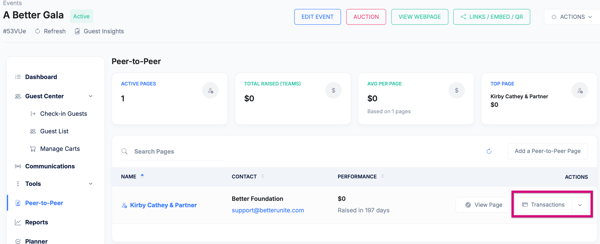
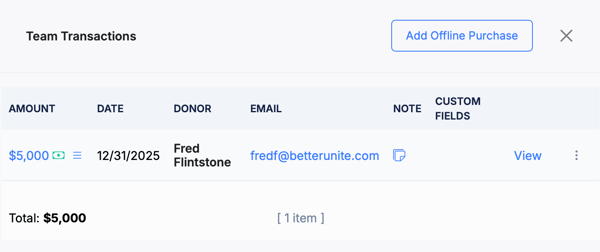
From here, you may also see the list of transactions and add an offline transaction to this fundraiser's campaign as well. ie. checks or cash.
Need Additional Help?
We're here to assist you in any way we can. Don't hesitate to reach out to support@betterunite.com
Let's go do some good.