-1.png?width=240&height=100&name=Heading%20(2)-1.png)
A matching pledge is a promise from one donor that depends on what everyone else gives. A board member offers $50,000 if the gala raises $250,000. A family foundation offers to match every gift dollar for dollar, up to $25,000. A local business offers to double whatever comes in during the first hour of the paddle raise.
You record all of these as a pledge, on the same record you already use for pledges, with the condition attached to it. Until the condition is met, the money is held out of your event totals. When the condition is met, the pledge becomes an ordinary pledge and you collect it the way you collect any other.
Why the money is held out until the condition is met
This is the part worth understanding before you set one up, because it explains almost everything else about how matching pledges behave.
A conditional promise is not money you are entitled to yet. If the event does not reach the number, the donor does not owe you anything, so counting it in Total Raised would overstate what you have raised. Accounting rules say the same thing: a gift with a match requirement attached is a conditional contribution, and it is not recognized as revenue until the condition is overcome. Your auditor will expect it to sit outside your totals until then.
So a matching pledge that is still waiting:
- Shows in your pledge lists, on the contact record, and on the event, so you never lose sight of it.
- Is left out of Total Raised, out of your goal percentage, out of pledge balances, and out of past due counts.
- Has no pledge amount of its own. The figure you see is the most the donor is offering, labeled potential.
- Is not sent to Virtuous, and cannot be invoiced or put on a payment schedule.
All of that changes the moment the condition is met.
The four kinds of matching pledge
When you turn on matching, you start from one of four presets. They are all the same underlying feature at different settings, so you can start from the closest one and adjust.
| Preset | What the donor is saying | How it pays out |
|---|---|---|
| Challenge gift | "I will give $50,000 if you raise $250,000." | All at once, when the event reaches the amount. |
| Match pool | "I will match every gift dollar for dollar, up to $25,000." | Gradually, growing with every gift that comes in. |
| Power hour | "I will double everything given between 7pm and 8pm, up to $10,000." | Gradually, but only counting gifts inside the window. |
| Board challenge | "I will give $20,000 once 300 people have given." | All at once, when the number of donors is reached. |
The difference that matters most is between the first and the second. A challenge gift is all or nothing: reach the number and you get the whole amount, fall short and you get nothing. A match pool pays out in proportion to what you raise, so there is no cliff.
Adding a matching pledge
- Go to Pledges and click Add Pledge.
- Choose the Pledger, which is the donor making the offer.
- Choose the Campaign. This is required for a matching pledge, because the condition is measured against one event.
- Turn on This pledge matches other giving.
- Pick the preset closest to what the donor offered.
- Fill in the four fields in The agreement, then read the sentence at the bottom of the panel.
- Click Save Pledge.
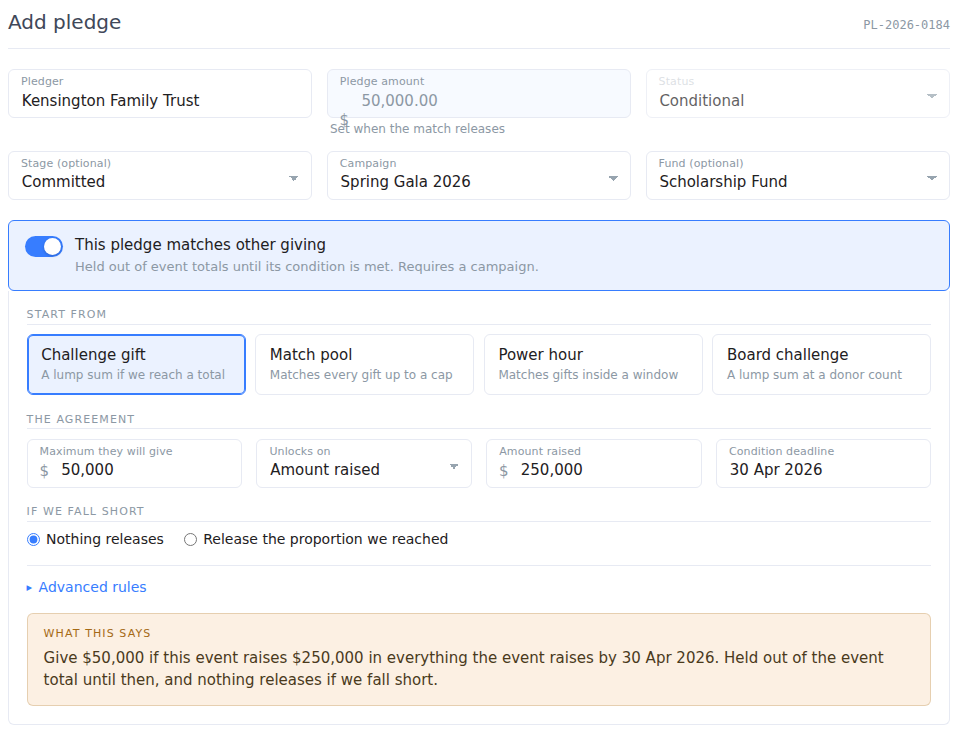
Two things change on the form as soon as you turn matching on, and both are deliberate:
- Pledge Amount goes read only and reads "Set when the match releases". A matching pledge's amount is worked out from the rules and from what your event raises, so there is nothing to type. Enter the most the donor will give in Maximum they will give instead.
- Status is locked to Conditional. You do not move a matching pledge along by changing its status. It releases itself when the condition is met, or you release it by hand from the pledge page, which is recorded against your name.
The sentence at the bottom of the panel
As you fill in the fields, the panel writes the whole agreement back to you in one sentence, in the words you would use with the donor:
Give $50,000 if this event raises $250,000 in giving levels and donations by 30 Apr 2026. Held out of the event total until then, and nothing releases if we fall short.
Read it before you save. There are a lot of rules available here, and the sentence is the quickest way to catch a setting that is not what the donor actually offered. It is saved with the pledge, so anyone who opens the record later sees the same sentence, whether or not they were the person who typed it in.
The four statuses
| Status | What it means | Counted in your totals? |
|---|---|---|
| Conditional | Waiting. The event has not reached the number yet. The row shows how far off it is, for example "Releases at $250,000, $61,400 to go". | No. Holds no amount. |
| Accruing | A match pool that is running. The amount grows with every qualifying gift and the row shows how much is left in the pool. | Yes. This is real money the donor already owes. |
| Pledged | Released. The condition was met, the amount is settled, and this is now an ordinary pledge you can invoice and collect. | Yes. |
| Condition not met | The deadline passed and the event did not get there. Nothing is owed. | No. |
Where the money appears, and where it does not
On the event dashboard, Raised never includes a matching pledge that is still waiting on its condition. Underneath it you will see a separate line, for example "$50,000 in matching funds not counted yet", with a note of how many pledges are waiting.
Keeping the two figures apart is the point. Raised is what you have; the line underneath is what is still on the table. Once a condition is met, the money moves out of that line and into Raised.
An accruing match pool is different, and worth saying plainly: what a pool has already matched is counted in Raised, because the donor owes it. Only the part of the pool that has not been earned yet sits in the line underneath.
Advanced rules
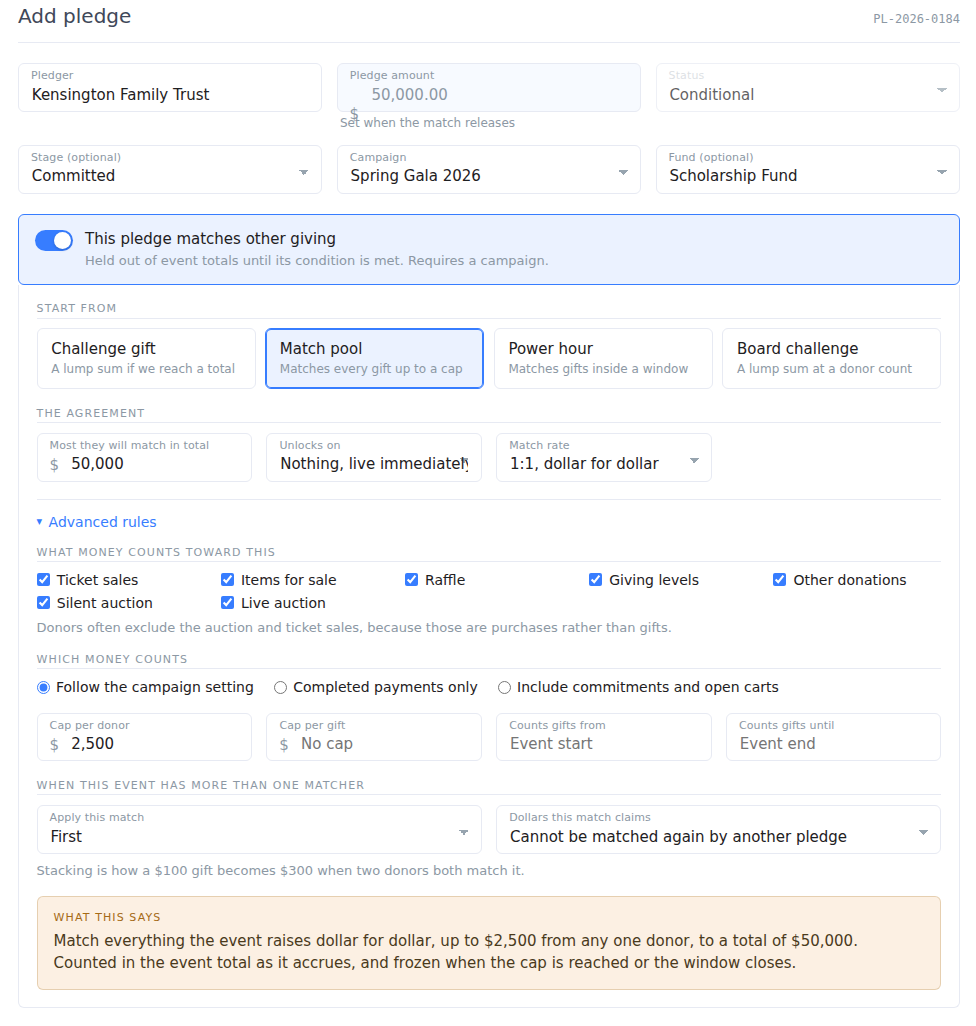
Most matching pledges need nothing beyond the four fields in The agreement. Open Advanced rules when the donor's offer has strings attached.
What money counts toward this
By default, everything your event raises counts. You can restrict it to any combination of ticket sales, items for sale, raffle, giving levels, other donations, the silent auction, and the live auction.
This is the rule donors ask for most often at a gala. Many will match the paddle raise and the donations but not ticket sales or the auction, on the grounds that those are purchases rather than gifts. Uncheck the categories the donor excluded and the sentence updates to name only the ones that count, so you have a record of what was agreed.
Which money counts
Choose whether commitments and open carts count toward the condition, or only completed payments. Leave it on Follow the campaign setting and it matches whatever your event's own progress display is set to, which keeps the pledge and the dashboard telling the same story.
Caps
- Cap per donor limits how much the match will pay against any one person's giving, however many gifts they make. "We will match up to $500 from any one donor" is this field.
- Cap per gift limits how much it will pay against a single gift.
Counts gifts from and until
An accrual window. Only gifts inside it count toward the pool. This is how you set up a power hour, and it is separate from the condition deadline: the window controls which gifts are matched, the deadline controls how long the offer stands.
Only match money raised past the unlock amount
This one only applies when you have set both a rate and an unlock amount, and it separates two offers that sound alike:
- On: "I will match everything you raise past $250,000, up to $50,000." The match starts counting at the bar.
- Off: "I will match the whole night dollar for dollar, up to $50,000, as long as you clear $250,000." The bar is a gate; once you pass it, everything counts.
More than one matcher on the same event
Events often have two or three donors offering to match. Each one is its own pledge, and two settings decide how they interact.
Apply this match sets the order they are worked out in. Dollars this match claims decides whether the same gift can be matched twice:
- Cannot be matched again by another pledge: the matchers share out the event's giving between them. A $100 gift is matched once, and the two donors together give $100.
- Can also be matched by another pledge: both donors match the same gift. A $100 gift becomes $300 in total, $100 from the donor and $100 from each matcher.
Stacking is a real thing donors agree to, and it is a generous offer, so it is worth being certain which one you were promised before you save.
When the condition is checked
You do not have to do anything to make a match release. It is checked:
- Every time a gift is taken online or at the event, so a condition can be met in the room and the pledge is released before the auctioneer has finished the sentence.
- When you save the pledge, so a match recorded after the money is already in releases straight away.
- Overnight, which is what closes off deadlines and accrual windows that have passed.
Every release, and every failure to release by the deadline, is written to the pledge's activity history with the figure behind it, so you can always see what the event had raised at the moment the money was released.
Checking or releasing a match by hand
Open the pledge and look at the Matching condition card. It shows the agreement, what is on the table, what has been released, how much has been counted toward the condition, and a progress bar toward the number.
Two buttons sit in the corner of that card:
- Check now re-checks the condition against the event as it stands right now. Reach for this after you have entered gifts offline or backdated a donation, because money entered that way does not trigger a check on its own.
- Release now releases the match by hand, for the cases the system cannot see. You can release for less than the maximum. The amount is then settled, and the release is recorded against your name.
Both buttons disappear once a match is settled, because a released amount is history.
If the event falls short
Set a Condition deadline and choose what happens if you do not get there:
- Nothing releases. All or nothing, which is how most challenge gifts are written. At the deadline the pledge becomes Condition not met and nothing is owed.
- Release the proportion we reached. The donor gives the same share of their offer as you reached of the goal. Two thirds of the way to $250,000 releases two thirds of the $50,000.
Ask the donor which one they meant. Both are common, and the difference is the whole gift.
Questions we get asked
Why is the pledge amount blank?
Because nothing is owed yet. The figure in the list is what the donor is offering, marked as potential. A real pledge amount appears the moment the condition is met.
Does a matching pledge count toward my campaign goal?
Not while it is waiting. Once it releases it counts like any other pledge, and your goal percentage moves with it.
Can I invoice a matching pledge, or send payment instructions?
Not until it releases, because the amount is not settled and the donor does not owe anything yet. Afterward it works exactly like any other pledge, including milestones and payment schedules.
What if a refund drops us back below the number?
A released match stays released. Once the condition has been met and the donor has been told, reversing it is a conversation with the donor rather than something the system should decide on its own. If you do need to undo it, edit or cancel the pledge as you would any other.
Can I change the rules after it has released?
You can edit the pledge, but the released amount is frozen and editing the rules will not restate it. The card shows the figure the event had reached when it settled, so the number always has its reasoning attached.
Does it sync to Virtuous?
Only once it releases. A conditional pledge is deliberately held back, so Virtuous never receives revenue the organization is not entitled to yet.
How do I turn a matching pledge back into an ordinary one?
Open it, turn the matching switch off, and save. The rules are cleared and the pledge becomes an ordinary pledge, so nothing is left behind to fire later.