-1.png?width=240&height=100&name=Heading%20(2)-1.png)
Admins can now select pledges and send a custom email message directly to the pledgers from within the pledge management screen. This makes it easier to follow up with pledgers about payments, share updates, or send payment instructions in bulk — all without leaving BetterUnite.
How to Message Pledgers
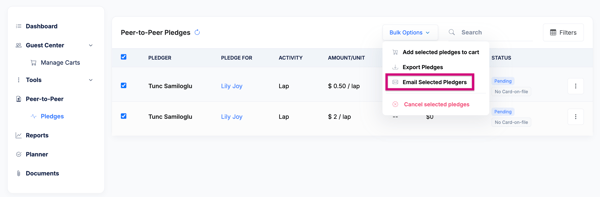
- Navigate to your campaign’s Dashboard>Peer to Peer>Pledges section.
- Select one or more pledges using the checkboxes.
- Click Message Pledgers (or the email icon) in the bulk action menu.
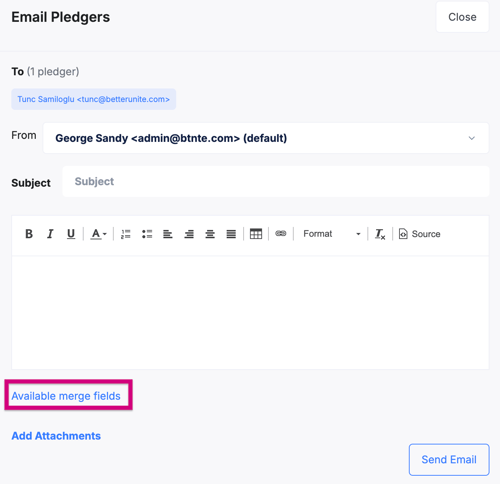
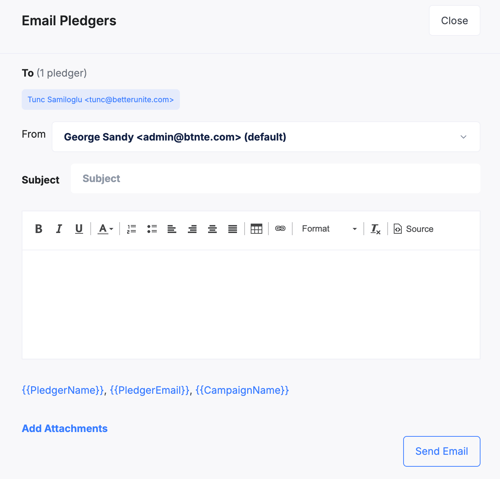
- Compose your message. Use the available merge fields to personalize it (e.g., pledger name, pledge amount, activity name).
- Click Send.
Note: Messaging pledgers is distinct from the standard “Send Payment Instructions” flow. Use Message Pledgers for custom outreach; use Add Selected Pledges to Carts>Manage Carts>Send Payment Instructions when you want to trigger the payment link email.
Frequently Asked Questions
Can I message all pledgers at once?
Yes. Use the select-all checkbox to select every pledge, then use the Message Pledgers action to send to all of them at once.
What merge fields are available?
Available merge fields include pledger name, pledger email, and campaign name.
Need Additional Help?
We’re here to assist you in any way we can. Don’t hesitate to reach out to support@betterunite.com
Let’s go do some good.