-1.png?width=240&height=100&name=Heading%20(2)-1.png)
BetterUnite provides several automated email notifications to keep members informed about their subscription status and payments. These notifications help reduce missed payments, prevent unexpected cancellations, and improve the overall member experience. They apply to all recurring membership payments.
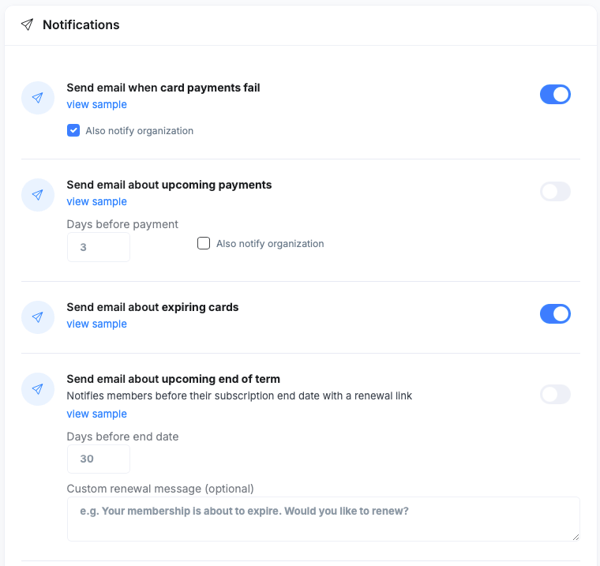
BetterUnite sends five types of membership notification emails: Card Payment Failed, Upcoming Payment Reminder, Expiring Card, Pending Subscription Cancellation, and Subscription Cancelled.
Finding Notification Settings
All membership notification settings are managed in one place:
- Go to Contacts > Membership Management > Settings.
- Open the Notifications section.
- Enable or disable notifications using the toggles.
- Save your changes.
Each notification includes a "View sample" link so you can preview the email template before enabling it.
Member Notification Emails
The following five notifications are available. Each can be toggled on or off independently.
Card Payment Failed
Sent when a scheduled payment fails due to a card issue. This notification alerts the member immediately so they can update their payment method and avoid an unintentional membership lapse. Click View sample to preview the email.
Upcoming Payment Reminder
Sent before the member's next scheduled billing date. This notification provides transparency around billing, reduces surprise charges, and gives members time to update their payment details if needed. Click View sample to preview the email.
Expiring Card
Sent when the card on file is approaching its expiration date. This notification encourages proactive card updates and helps prevent payment failures before they happen. Click View sample to preview the email.
Pending Subscription Cancellation
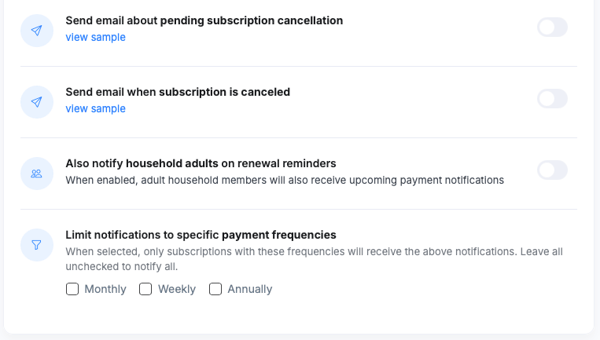
Sent when a cancellation has been scheduled but not yet applied — for example, when a member stops renewal at the end of the current period. This notification confirms the cancellation intent and prevents confusion about subscription status. Click View sample to preview the email.
Subscription Cancelled
Sent when a subscription has been fully cancelled. This notification confirms the subscription has ended, providing closure and reducing support inquiries. Click View sample to preview the email.
New Notification Controls
In addition to the five core member notifications above, BetterUnite provides four advanced controls that give you finer-grained management over how and when notifications are sent.
Admin/Team Copy
When enabled, a designated internal team member receives a copy of all member notification emails. Enter the recipient's email address in the Admin/Team Copy email field within Notification Settings. For example, if a member's card payment fails, the designated team member receives the same notification. This is useful for keeping your team informed about billing issues without having to manually monitor member accounts.
Reminder Timing
Configure how many days before the next renewal date the Upcoming Payment Reminder is sent. The default is 3 days. For organizations with annual membership plans, a longer window — such as 30 days — is recommended so members have adequate time to update payment information or review their renewal before it processes.
Billing Frequency Filter
Choose which billing frequencies receive the Upcoming Payment Reminder. For example, you may want to send the reminder only to annual subscribers (who may not expect the charge) while skipping it for monthly subscribers who are accustomed to regular billing. Select one or more billing frequencies — such as monthly, quarterly, or annual — to apply the reminder selectively. If no frequency is selected, the reminder is sent to all billing frequencies by default.
Household Adult Renewal Reminders
When enabled, adult household members receive the same renewal reminder email as the primary subscriber. By default, only the primary subscriber (the account holder responsible for billing) receives renewal reminders. Enabling this toggle ensures all adult members in a household are aware of the upcoming renewal.
Frequently Asked Questions
Can I preview what each notification email looks like before enabling it?
Yes — click View sample next to any notification to see the email template members will receive.
Can I customize the wording of the notification emails?
The notification templates are system-generated and the core content cannot be customized. However, your organization name and branding appear in the emails.
Do household members receive the same notifications as the primary subscriber?
By default, only the primary subscriber (the account holder responsible for billing) receives renewal reminder notifications. To also notify adult household members, enable the "Also notify household adults on renewal reminders" toggle in notification settings.
If I turn off a notification, will it affect notifications already scheduled to go out?
Disabling a notification toggle stops future sends immediately. Any notification that has already been triggered and queued may still go out, but new triggers will not send.
Need Additional Help?
We're here to assist you in any way we can. Don't hesitate to reach out to support@betterunite.com
Let's go do some good.