-1.png?width=240&height=100&name=Heading%20(2)-1.png)
When a payout is processed through Stripe, BetterUnite sends a notification email to admins who have financial management access. A new toggle in your organization’s settings allows individual admins to turn off these payout notifications.
How to Disable Payout Notifications
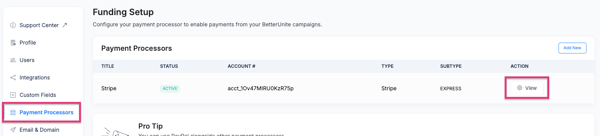
- Navigate to your organization’s Settings>Payment Processor.
- Select View next to the Stripe account.
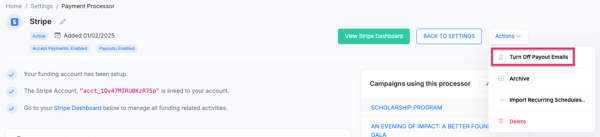
- Select Actions>to stop receiving payout notification emails.
Frequently Asked Questions
Who receives payout notifications by default?
Admins who have financial management permissions on the organization receive payout notifications by default.
Does turning this off affect guest receipts?
No. Guest receipts for ticket purchases and donations are separate from payout notifications. You can turn off Stripe Receipts for Purchasers by going to Settings>Profile>Select Disable Stripe receipts
Will I still get Stripe emails?
If your organization uses Stripe Express, Stripe may send its own notification emails separately. Those are controlled by your Stripe account settings, not by BetterUnite.
Need Additional Help?
We’re here to assist you in any way we can. Don’t hesitate to reach out to support@betterunite.com
Let’s go do some good.