-1.png?width=240&height=100&name=Heading%20(2)-1.png)
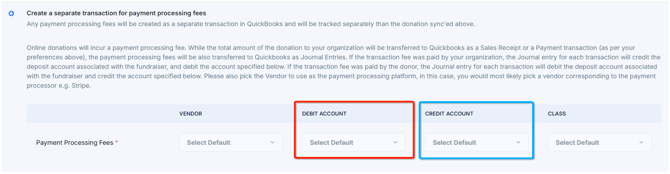
One of the options for how you'd like to track the payment processing fees in your Quickbooks is the ability to create a separate transaction representing the fees i.e. Journal Entry. Please see below sample images as reference for the rest of this article:
The option to integrate processing fees as separate journal entries.
How the Donations are mapped for sales receipt creation

Big picture (what you’re doing)
You are:
-
Recording the donation itself as a Sales Receipt or Payment
-
Recording the payment processing fee separately as a Journal Entry
That separation is very common and is often preferred by accountants because:
-
Revenue stays gross
-
Fees are clearly tracked as an expense
-
Deposits reconcile cleanly with the bank
Preparing the Journal Entry
When the integration is preparing the journal entry during the sync process, the following logic is applied:
Online donations may incur a payment processing fee. The full donation amount will be sent to QuickBooks as a Sales Receipt or Payment (based on your preferences above). Payment processing fees are recorded separately in QuickBooks as Journal Entries.
If your organization pays the processing fee, each Journal Entry will credit the fundraiser's deposit account and debit the expense account selected below. If the donor pays the processing fee, each Journal Entry will debit the fundraiser's deposit account and credit the account specified.
The key clarification: “deposit account”
Campaign deposit account / sales receipt deposit account
= the Undeposited Funds or Clearing account you put on the Sales Receipt in QuickBooks
This is not the expense account.
It’s the temporary holding account representing what the payment processor owes you.
Common examples:
-
Undeposited Funds
-
Stripe Clearing
-
Donations Clearing
When the UI says:
“deposit account associated with the fundraiser”
it means:
“the same account you selected as the Deposit To account on the Sales Receipt”
Case-by-case logic check
Case 1: Organization pays the processing fee
What actually happens in real life
Donor gives $100
Processor takes $3
Bank receives $97
QuickBooks entries
1️⃣ Sales Receipt
Debit   Undeposited Funds / Clearing     100
Credit  Donation Revenue                100
2️⃣ Journal Entry for the fee
Debit   Payment Processing Fees Expense   3
Credit  Undeposited Funds / Clearing      3
Result:
Clearing account balance = 97
Matches bank deposit
Fees are properly expensed
Case 2: Donor pays the processing fee
What actually happens
Donor is charged $103
Organization receives $100
Processor keeps $3
QuickBooks entries
1️⃣ Sales Receipt
Debit   Undeposited Funds / Clearing     103
Credit  Donation Revenue                103
2️⃣ Journal Entry for the fee
Debit   Undeposited Funds / Clearing      3
Credit  Processing Fee Offset Account    3
This credit account is often:
“Processing Fee Reimbursement”
Or a contra-revenue account
Result:
Clearing account nets to 100
Revenue reflects the full donor charge
No expense recorded (because donor paid it)
✅ This logic is sound and consistent with GAAP practices.
Vendor selection (Stripe, PayPal, etc.)
QuickBooks likes:
Journal Entries tied to a Vendor
Especially when expenses are involved
Choosing “Stripe” or “PayPal” as the vendor:
Helps with reporting
Keeps accountants happy
Matches how many native integrations behave