-1.png?width=240&height=100&name=Heading%20(2)-1.png)
The Re-activate Subscription feature lets admins restart a subscription that has been cancelled, marked as failed, or completed — without asking the member to go through the sign-up process again. BetterUnite regenerates the invoices and resumes billing on the member's card on file.
When to Use Re-activate
Re-activate is the right tool in the following situations:
- A member cancelled but wants to rejoin. Instead of sending them to a sign-up page, an admin can reinstate their existing subscription on the original plan, preserving their record and payment history.
- A subscription failed due to a card issue. Once the payment method is updated on the member's contact record, an admin can reinstate the subscription rather than waiting for the member to re-enroll from scratch.
- A fixed-cycle subscription completed its term. If the member wants to continue after a completed subscription, an admin can reinstate it and set a new start date.
How Re-activate Differs from Other Actions
- Stop Renewal prevents a future renewal but keeps the subscription active through the current billing term. The member retains access until the end of the period.
- Cancel ends the subscription immediately. The member loses active status right away.
- Re-activate restarts a subscription that has already ended or failed, resuming billing from a chosen date.
How to Re-activate a Subscription
- Go to Contacts > Membership Management > Subscriptions.
- Find the subscription you want to reinstate. The subscription must have a status of Cancelled, Failed, or Completed for the Reinstate option to appear in the menu.
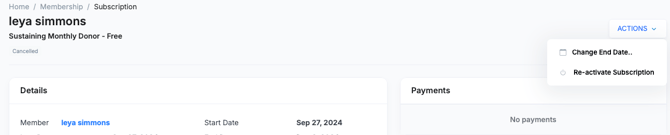
- Click the three-dot menu on the subscription row, or open the subscription detail page and click Actions.
- Select Re-activate Subscription.
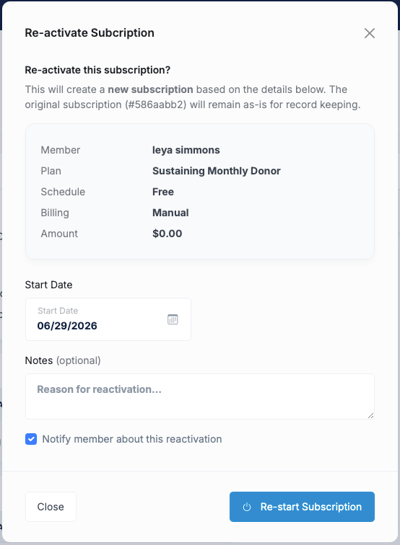
- A dialog will appear asking you to choose a restart date. You can set it to today or a future date.
- Click Confirm. BetterUnite will regenerate the invoice schedule and resume billing on the member's card on file starting from the chosen date.
What Happens After Re-activation
- The subscription status changes back to Active.
- Invoices are regenerated from the restart date forward based on the original plan's billing schedule.
- Billing resumes on the card on file. If the card has changed, update it on the member's contact record before reinstating to avoid a failed first payment.
- The member does not receive a re-enrollment confirmation email — reinstatement is an admin action. If you want to notify the member, send them a message manually from their Member Detail page.
- The subscription history is preserved — previous payments and cancellation dates remain visible on the subscription detail page.
Frequently Asked Questions
Can I re-activate a subscription on a different plan?
No. Reinstate restarts the subscription on its original plan. If the member wants to switch to a different plan, they should sign up through a Sign Up Page for the new plan.
What if the member's card on file has expired?
Update the payment method on the member's contact record before reinstating. If you reinstate with an expired card, the first invoice will likely fail. You can then apply a manual payment or wait for the member to update their card before the next billing attempt.
Will the member be notified automatically?
No. Reinstatement does not trigger an automatic email to the member. You can post a message to them from their Member Detail page or reach out directly.
Can I re-activate a subscription that was cancelled by the member from the portal?
Yes. Admin-side re-activation works regardless of whether the cancellation was initiated by the admin or by the member through their Supporter Portal.
Need Additional Help?
We're here to assist you in any way we can. Don't hesitate to reach out to support@betterunite.com
Let's go do some good.