-1.png?width=240&height=100&name=Heading%20(2)-1.png)
Saved searches in BetterUnite are called Dynamic Lists. A Dynamic List lets you save a specific contact view—including filters, columns, and sorting—so you can quickly return to it anytime. Unlike static lists, Dynamic Lists automatically update as your data changes.
What is a Dynamic List?
A Dynamic List is a saved contact view that is driven by rules and filters rather than a fixed set of contacts.
When contacts are added or updated in your database:
-
Contacts that match the criteria are automatically included
-
Contacts that no longer match are automatically removed
This makes Dynamic Lists ideal for tracking groups like:
-
New donors
-
Recurring donors
-
Lapsed supporters
-
Event attendees
-
Members with active subscriptions
How to create a Dynamic List
-
Go to Contacts.
-
Use Search or Advanced Search to filter contacts exactly how you want.
-
Adjust the columns so the view shows the data most important to you.
-
Once your view is set, click the bookmark icon (Save view).
-
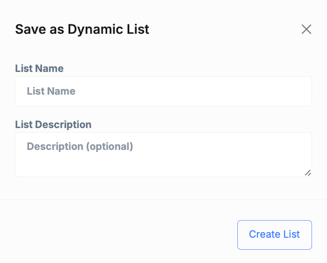
Choose Save as Dynamic List.
-
Enter a List Name and optional description.
-
Click Create List.
Your saved view is now a Dynamic List.
Where Dynamic Lists appear
-
Dynamic Lists appear at the top of the Contacts page alongside default views like All Contacts, New Donors, and Recurring Donors.
-
You can drag and reorder Dynamic Lists to customize their order.
-
Clicking a Dynamic List instantly restores its saved filters and columns.
Example below

Managing Dynamic Lists
To manage all lists:
-
Go to Contacts.
-
Click Lists in the toolbar.
-
Select Manage Lists.
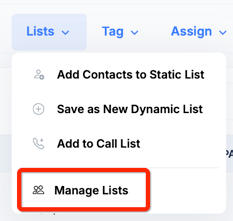
From here, you can:
-
View all Dynamic and Static Lists
-
Rename lists
-
Edit descriptions
-
Delete lists you no longer need
Dynamic Lists vs Static Lists
| Feature | Dynamic List | Static List |
|---|---|---|
| Updates automatically | ✅ Yes | ❌ No |
| Based on rules/filters | ✅ Yes | ❌ No |
| Fixed set of contacts | ❌ No | ✅ Yes |
| Best for ongoing tracking | ✅ Yes | ❌ No |
| Best for one-time actions | ❌ No | ✅ Yes |
Use Dynamic Lists when you want an always-up-to-date view.
Use Static Lists when you want to lock in a specific group of contacts for a one-time purpose.
When should I use Dynamic Lists?
Dynamic Lists are especially useful for:
-
Ongoing outreach and segmentation
-
Fundraising and donor tracking
-
Membership and subscription monitoring
-
Campaign preparation and reporting
They save time by eliminating the need to rebuild the same searches again and again.
Tip: Because Dynamic Lists remember both filters and columns, they’re not just saved searches—they’re fully customized working views tailored to how you manage relationships in BetterUnite.