-1.png?width=240&height=100&name=Heading%20(2)-1.png)
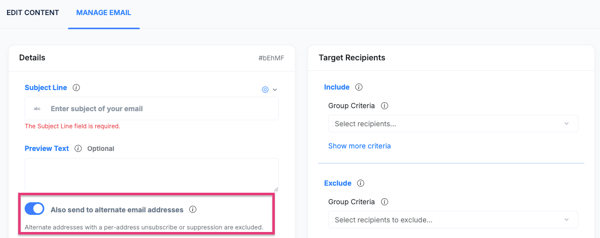
Contacts in BetterUnite can have a primary email address as well as one or more secondary email addresses. Previously, mass emails sent through the Manage Email tool only reached primary addresses. You can now toggle on the option to also send to secondary email addresses.
How to Include Secondary Email Addresses
- After composing and designing your Email Content. Navigate to the Manage Email section for your email.
- Before sending, look for the .
- Toggle on the Also send to alternate email addresses toggle to include secondary addresses in the send.
- Proceed with selecting your target recipients and send your email as normal.
Frequently Asked Questions
Where do secondary email addresses come from?
Secondary email addresses can be added to a contact’s record manually in the CRM, or they may be collected when a contact checks out using a different email than what is on file.
Will a contact receive the email twice if I enable this?
Yes — if a contact has both a primary and a secondary email address on file, they will receive the email at both addresses when this toggle is enabled.
Need Additional Help?
We’re here to assist you in any way we can. Don’t hesitate to reach out to support@betterunite.com
Let’s go do some good.