-1.png?width=240&height=100&name=Heading%20(2)-1.png)
Important:
The Stripe Import integration is not a payment processing integration. It does not process payments through Stripe or connect Stripe to BetterUnite for live transactions. In order to enable payment processing, please go to settings->payment processing to review options.
This integration is used only to import transactions that already exist in your Stripe account (for example, payments collected outside of BetterUnite) so they can be recorded as donations and contacts inside BetterUnite.
The Stripe Import integration allows you to securely connect your Stripe account to BetterUnite and import Stripe charges as donations. Imported charges are matched to existing contacts when possible or used to create new contacts automatically.
This article explains how to:
-
Enable the Stripe Import integration
-
Connect your Stripe account
-
Query Stripe charges
-
Import charges into BetterUnite as donations
What the Stripe Import does
When you import Stripe charges:
-
Each Stripe charge is imported as a donation
-
Donations are associated with a contact
-
Contacts are matched by Stripe customer ID or email address
-
New contacts are created automatically when no match is found
-
Previously imported charges are not duplicated
This ensures your Stripe data stays accurate and consistent inside BetterUnite.
Enable the Stripe Import integration
Before importing charges, you must connect your Stripe account.
Steps to enable Stripe Import
-
Go to Settings in BetterUnite.
-
Open Stripe Import.
-
Click Enable Stripe Import.
-
Follow the instructions to retrieve your Stripe API keys:
-
Log in to your Stripe account
-
Go to Developers
-
Open API keys
-
Copy your Publishable Key and Secret Key
-
-
Paste both keys into BetterUnite.
-
Click Submit to verify the connection.
Once verified, Stripe Import is enabled for your organization.
Query Stripe charges
After enabling the integration, you can query Stripe for charges before importing them.
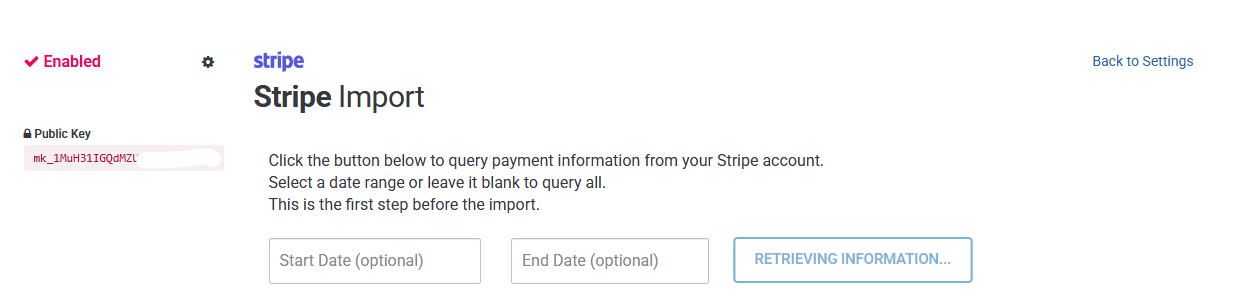
How querying works
-
Optionally select a Start Date and End Date
-
Leave dates blank to query all available charges
-
Click the retrieve button to fetch matching Stripe charges
BetterUnite displays a summary of:
-
Total charges found in Stripe
-
Charges already synced
-
Charges not yet synced
This lets you review what will be imported before proceeding.
Review charges before importing
Queried charges appear in a table for review.
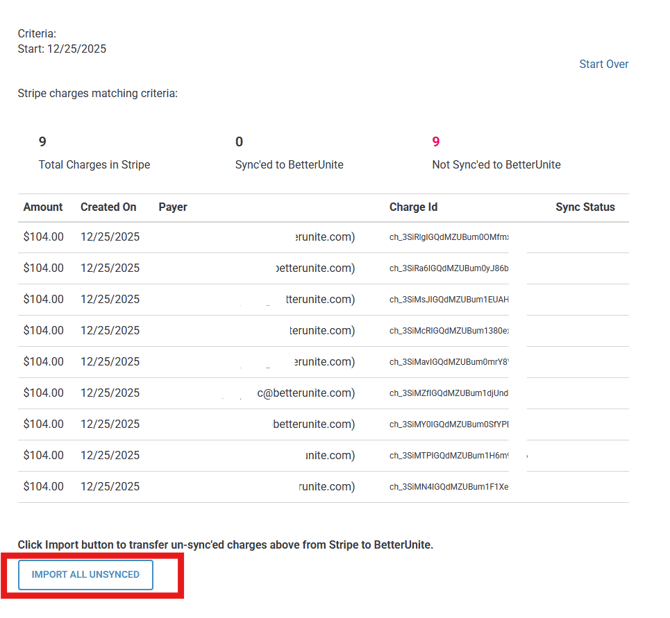
Each row includes:
-
Amount
-
Created date
-
Payer
-
Stripe charge ID
-
Sync status
Charges already imported into BetterUnite are excluded from future imports.
Import Stripe charges
To import charges:
-
Review the unsynced charges.
-
Click Import All Unsynced.
BetterUnite imports each charge individually and tracks progress during the import.
How contacts are matched or created
During import, BetterUnite automatically associates charges with contacts:
-
Stripe customer ID match
If a contact was previously imported from Stripe, the charge is linked automatically. -
Email address match
If no Stripe customer ID match is found, BetterUnite looks for an existing contact with the same email address. -
Create new contact
If no match exists, a new contact is created using the Stripe customer’s name and email.
This ensures donations are always linked to the correct person when possible.
How donations are created
Each imported Stripe charge becomes a donation in BetterUnite:
-
Donation amount is taken directly from Stripe
-
Donation date matches the Stripe charge date
-
Donations are assigned to your default campaign
-
Payment type is recorded as credit card
-
The Stripe charge ID is stored to prevent duplicates
An internal note is added to each donation indicating it was imported from Stripe.
Import results and history
After the import completes:
-
Successfully imported charges appear as donations
-
Any errors are recorded and skipped without stopping the entire import
-
Imported charges are marked as synced and will not be imported again
You can safely run Stripe Import multiple times without creating duplicates.
Important notes and best practices
-
Stripe Import only imports charges, not refunds or disputes
-
Charges already imported will never be duplicated
-
You can import historical Stripe data at any time
-
Always review queried charges before importing
-
Ensure your default campaign is set before importing
Need help?
If you experience issues with Stripe Import:
-
Confirm your Stripe API keys are valid
-
Verify your date range
-
Contact BetterUnite support