-1.png?width=240&height=100&name=Heading%20(2)-1.png)
How to Find an Auction Item QR Code
-
Navigate to your Event Dashboard
-
Select the Auction button
-
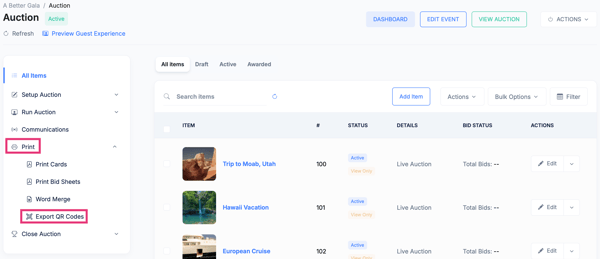
In the left menu select Print>QR Codes this will download a csv file that has each item's QR Code to copy and paste into a browser to download.
How the QR Code Is Used
-
Display it on printed item sheets, bid sheets, or signage
-
Show it on a projector or TV during your event
-
Allow guests to scan and bid instantly without searching for the item
Each auction item has its own unique QR code, ensuring guests are always directed to the correct item.
Need Additional Help?
We're here to assist you in any way we can. Don't hesitate to reach out to support@betterunite.com
Let's go do some good.