-1.png?width=240&height=100&name=Heading%20(2)-1.png)
Peer-to-Peer (P2P) fundraising allows your supporters to create personalized fundraiser pages — and optionally form teams — to raise money on behalf of your campaign. Once enabled, your campaign page will display a "Create a Fundraiser Page" button for supporters to get started.
The settings you configure here govern all P2P fundraiser pages created under your campaign. Individual fundraisers can customize their own pages within any limits you set.
To learn how the experience looks from a supporter's perspective, see How to Set Up a Peer-to-Peer or Team Fundraising Page.
Where to Find Peer-to-Peer Settings
You can enable and configure Peer-to-Peer either when first creating your campaign
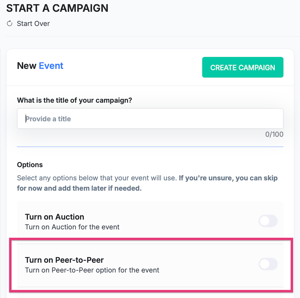
or at any time from your campaign's edit settings:
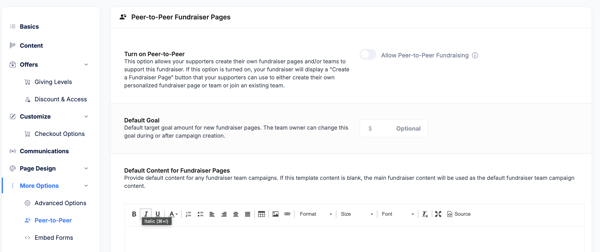
- Open your campaign and click Edit Campaign.
- In the left navigation, go to More Options and select Peer-to-Peer.
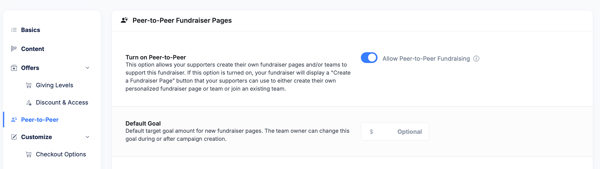
- Once Peer-to-Peer is activated, it expands into its own section in the left navigation menu.
Step 1: Turn On Peer-to-Peer
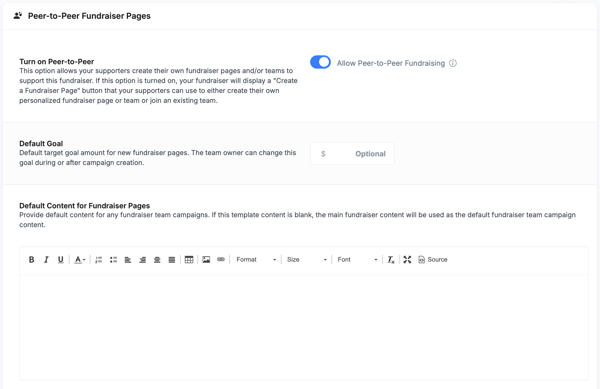
At the top of the Peer-to-Peer Fundraiser Pages panel, toggle on Allow Peer-to-Peer Fundraising. This is required before any other P2P settings take effect.
Default Goal
Set an optional default fundraising goal that will pre-populate on each new fundraiser page. Individual fundraisers and team owners can adjust their goal during or after page creation.
Default Content for Fundraiser Pages
Add default text content that will appear on new fundraiser pages. If left blank, the main campaign content will be used as the default.
Step 2: Configure the Peer-to-Peer Experience
These settings control how the P2P experience appears to supporters on your campaign page and during checkout.
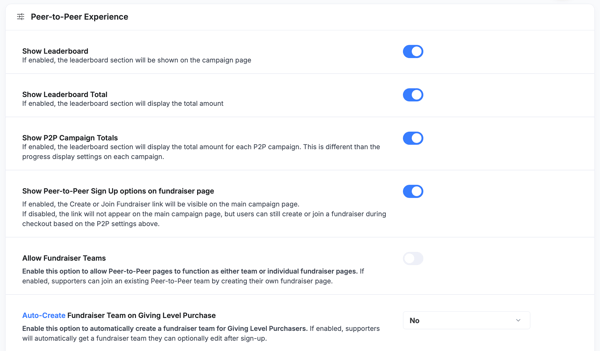
Leaderboard Settings
- Show Leaderboard — Displays the fundraiser leaderboard section on your campaign page.
- Show Leaderboard Total — Shows the total amount raised in the leaderboard section.
- Show P2P Campaign Totals — Shows the total raised by each individual P2P campaign within the leaderboard. This is separate from the progress bar display settings on each campaign.
Sign-Up Visibility
Toggle Show Peer-to-Peer Sign Up options on [campaign] page to control whether the "Create or Join a Fundraiser" link appears on your main campaign page. If disabled, supporters can still create or join a fundraiser during the checkout process based on your P2P settings.
Note: On event campaigns this setting is labeled "on event page"; on giving campaigns it is labeled "on fundraiser page."
Fundraiser Teams
Enable Allow Fundraiser Teams to let supporters create team fundraiser pages and invite others to join their team. This allows someone to create a fundraising page on someone else's page.
Here is how the hierarchy works: your organization creates the main ("parent") campaign. A supporter then creates their own fundraiser ("child") page under it. If that supporter also wants to host a team, other supporters can join and create their own sub-pages ("grandchild" pages). Enabling Allow Fundraiser Teams makes it possible to create these grandchild-level pages.
Auto-Create Fundraiser Team
This setting automatically creates a fundraiser team for a supporter when they complete a purchase. They can optionally edit the team after sign-up.
- On event campaigns: The option reads Auto-Create Fundraiser Team on Ticket Purchase.
- On giving/fundraising campaigns: The option reads Auto-Create Fundraiser Team on Giving Level Purchase.
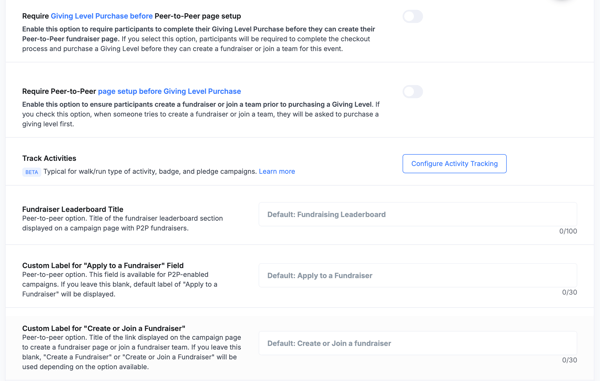
Require Purchase or P2P Page Setup First
You can enforce a specific order between purchasing and creating a fundraiser page. These two options are mutually exclusive.
- Require [Purchase] before Peer-to-Peer page setup — Participants must complete checkout before they can create or join a fundraiser or team.
- Require Peer-to-Peer page setup before [Purchase] — Participants must create a fundraiser or join a team before they can complete checkout.
On event campaigns, "[Purchase]" refers to a Ticket Purchase. On giving/fundraising campaigns, it refers to a Giving Level Purchase.
Track Activities
This feature enables activity tracking for walk/run, badge, and pledge campaigns. Note: Activity tracking may not be available on all account plans — contact support@betterunite.com if you don't see this option. Click Configure Activity Tracking to set it up. Learn more: What is Peer-to-Peer Activity Tracking?
Custom Labels
Customize the terminology and button labels used throughout your P2P experience. All fields are optional — default values are shown as placeholder text.
- Fundraiser Leaderboard Title — Title shown above the leaderboard section on your campaign page (default: "Fundraising Leaderboard"). Up to 100 characters.
- Custom Label for "Apply to a Fundraiser" Field — Renames the field shown at checkout for joining an existing fundraiser.
- Custom Label for "Create or Join a Fundraiser" — Renames the link displayed on the campaign page.
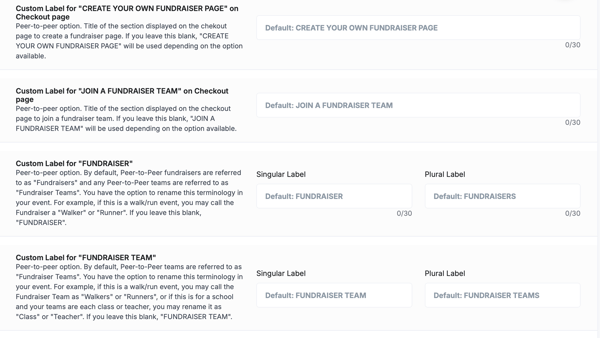
- Custom Label for "CREATE YOUR OWN FUNDRAISER PAGE" on Checkout page — Renames the section header on the checkout page.
- Custom Label for "JOIN A FUNDRAISER TEAM" on Checkout page — Renames the section header for joining a team at checkout.
- Custom Label for "FUNDRAISER" — Rename the term "Fundraiser" with a singular and plural label (e.g., "Walker" / "Walkers" for a walk/run event).
- Custom Label for "FUNDRAISER TEAM" — Rename the term "Fundraiser Team" with a singular and plural label (e.g., "Class" / "Classes" for a school campaign).
Step 3: Set Fundraiser Lock Options
Lock options let you prevent fundraiser page owners from changing specific settings on their pages. These restrictions apply only to fundraisers outside your organization — as the campaign admin, you can always modify these settings regardless of what's locked. For details on how each lock affects the fundraiser experience, see Peer-to-Peer Fundraiser Page Lock Options.
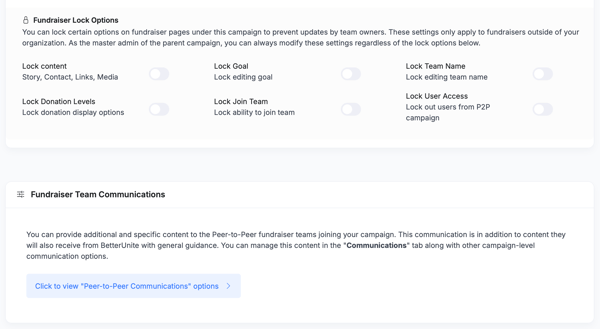
Available lock options:
- Lock content — Prevents editing of story, contact info, links, and media.
- Lock Goal — Prevents fundraisers from changing their goal amount.
- Lock Team Name — Prevents editing of the fundraiser team name.
- Lock Donation Levels — Prevents changes to donation display options.
- Lock Join Team — Prevents supporters from joining the fundraiser's team.
- Lock User Access — Locks out users from accessing the P2P campaign.
Step 4: Fundraiser Team Communications
You can send additional, campaign-specific content to the Peer-to-Peer fundraiser teams joining your campaign. This communication is in addition to the general guidance they receive from BetterUnite automatically.
Click View Peer-to-Peer Communications options to manage these messages. This will take you to the Communications tab where you can configure all campaign-level and P2P-specific communication settings in one place. For a full breakdown of P2P email options, see Peer-to-Peer (P2P) Communications and Automated Email Templates for Peer-to-Peer Fundraiser Milestones.
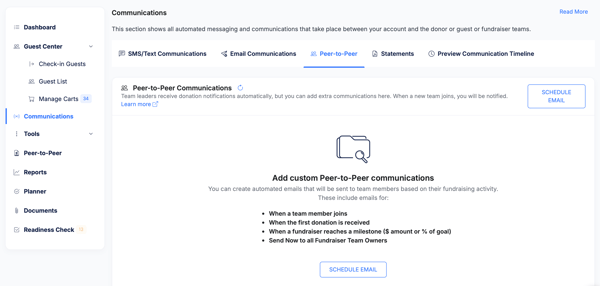
Fundraiser Team Resources
Upload reference documents and other resources for all fundraisers joining your campaign. These files are only visible to fundraiser owners within their accounts, not to the general public. Each file must be 10 MB or smaller.
Click Add document to upload files, or use the add new files link within the section.
This section is available on both event and giving/fundraising campaigns.

Campaign Type Differences at a Glance
Most P2P settings are identical across campaign types. The table below highlights the settings that differ based on whether your campaign is an event or a giving/fundraising page.
| Setting | Event Campaign | Giving/Fundraising Campaign |
|---|---|---|
| Sign-up visibility label | Show P2P Sign Up options on event page | Show P2P Sign Up options on fundraiser page |
| Auto-create fundraiser team | Auto-Create on Ticket Purchase | Auto-Create on Giving Level Purchase |
| Require purchase before P2P setup | Require Ticket Purchase before P2P page setup | Require Giving Level Purchase before P2P page setup |
| Require P2P setup before purchase | Require P2P page setup before Ticket Purchase | Require P2P page setup before Giving Level Purchase |
Related Articles
- How to Set Up a Peer-to-Peer or Team Fundraising Page — The supporter-facing walkthrough
- Create or Edit a Peer-to-Peer Fundraising Page as the Organizer
- How to Add, View and Manage Child or Peer-to-Peer Fundraiser Campaigns (Admin)
- Peer-to-Peer Fundraiser Page Lock Options
- Peer-to-Peer (P2P) Communications
- What is Peer-to-Peer Activity Tracking?
Need Additional Help?
We're here to assist you in any way we can. Don't hesitate to reach out to support@betterunite.com
Let's go do some good.