-1.png?width=240&height=100&name=Heading%20(2)-1.png)
Overview
BetterUnite’s auction tools allow organizations to:
-
Expand bidding beyond event attendees
-
Increase bidder engagement before, during, and after an event
-
Use advanced bidding strategies to grow revenue
-
Simplify communication, checkout, and reporting
Use the best practices below when planning and managing your auction.
1. Define Your Auction Goals
Before setting up your auction, determine your goals, such as:
-
Total revenue target
-
Silent vs. live auction revenue
-
Number of registered bidders
-
Percentage of bidders who preauthorize payment
Clear goals help guide decisions about auction timing, item strategy, and feature usage.
2. Expand Participation with Bidder Registration
Use BetterUnite’s Bidder Registration option to open your auction to supporters who are not attending your event in person. See this article for more information.
Benefits include:
-
Allowing remote supporters to bid online
-
Increasing competition for auction items
-
Growing overall auction revenue
3. Open Your Online or Silent Auction Early
Launching your online or silent auction ahead of your event helps build momentum.
Best practices:
-
Open bidding several days before your event
-
Promote featured items in advance
-
Encourage bidders to register early
Why this matters:
Opening your auction early increases the number of bidders who preauthorize their cards, which significantly speeds up check-in and checkout during your event.
4. Create High-Quality Auction Items
Strong item presentation leads to higher bids.
In BetterUnite, you can:
-
Add up to 10 images and short videos per auction item
-
Include clear titles, values, and restrictions
-
Highlight experiences, exclusivity, and mission impact
To save time and improve quality, use BetterAI to help generate compelling auction item descriptions that encourage bidding. See Add Auction Item for detailed instructions.
5. Communicate Clearly with Custom Messaging
Clear communication improves bidder confidence and reduces questions.
Use BetterUnite’s custom messaging tools to:
-
Explain how bidding works
-
Share auction start and end times
-
Provide checkout and item pickup instructions
-
Send reminders and featured-item promotions
Consistent messaging ensures bidders know what to expect at every stage of the auction. See Communications, Event Email Suggestions, Suggested Text Messages and How to test your event for additional help.
6. Increase Revenue with Advanced Bidding Features
BetterUnite offers Advanced Bidding tools designed to generate additional revenue from your auction.
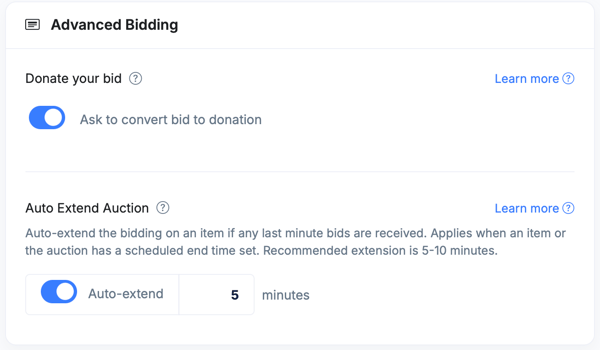
Donate Your Bid
Encourages non-winning bidders to donate a portion of their bid amount, capturing additional contributions from engaged participants. Learn More Here
Auto-Extend Auction
Automatically extends bidding if a last-minute bid is placed, preventing bid sniping and increasing fair competition. Learn More Here
A 5–10 minute extension is recommended.
These features are available with the Advanced Bidding add-ons within your Auction Settings.
7. Leave Your Auction Open After the Event
Organizations often see higher revenue by keeping their online or silent auction open 24–48 hours after an in-person event.
Results may include:
-
Increased bidding after attendees revisit items and after not winning live auction items
-
Additional participation from non-attendees
-
Revenue increases of up to 30% for silent auctions
This approach gives bidders more time to engage and rebid while not being distracted with conversation.
8. Prepare Staff and Volunteers
Ensure your team is familiar with BetterUnite’s auction tools, including:
-
Bidder registration and assistance
-
Monitoring bids and item performance
-
Supporting mobile bidding
-
Managing checkout and item fulfillment
Well-prepared staff and volunteers contribute to a smoother auction experience. View Run Your Auction resources or contact your account manager for additional help.
9. Streamline Checkout and Follow-Up
After bidding closes:
-
Send winning bidder communications
-
Communicate item pickup or delivery details
-
Thank bidders and donors promptly
BetterUnite’s integrated checkout and automated communication tools help ensure a professional and efficient close to your auction. See Close your Auction resources.
10. Review Results and Optimize Future Auctions
After your auction concludes, review:
-
Revenue by item and category
-
Bidder participation trends
-
Performance of advanced bidding features
Use these insights to refine your strategy and improve future auctions. See Auction Reports here.
Summary
By using BetterUnite’s auction tools and following these best practices, organizations can:
-
Reach more bidders
-
Increase auction revenue
-
Improve bidder experience
-
Reduce administrative effort
Need Additional Help?
We're here to assist you in any way we can. Don't hesitate to reach out to support@betterunite.com
Let's go do some good.