
Step 1: Flag the items that are taxable
- Open the item. For items for sale, go to your event's Items for Sale tab. For auction items, go to the Auction tab.
- Turn on Sales Tax Applicable?
- Save the item.
This flag does not change the price and does not calculate tax. When a guest buys the item, their cart shows an indicator so you know to add tax.

Step 2: Add tax to one guest's cart
- Work out the tax from the guest's shipping location or your own tax rules.
- In your Event Dashboard, open Guest Carts.
- Click the Edit button on the guest's cart, or use the Quick Add tab and find the guest or bidder.
- Leave Offer blank or choose the Donation category.
- Enter the amount and a note such as "Sales Tax". The note shows in the cart at checkout.
- Click Add to Cart.
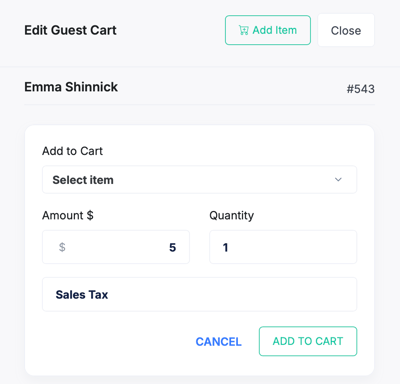
The charge now shows in the cart and the guest can be checked out.
Step 3: Add tax to many carts at once
- On Guest Carts, click BULK ADD CHARGES...
- Enter the amount and a description such as "Sales Tax".
- Select the carts or items to apply it to, then confirm.

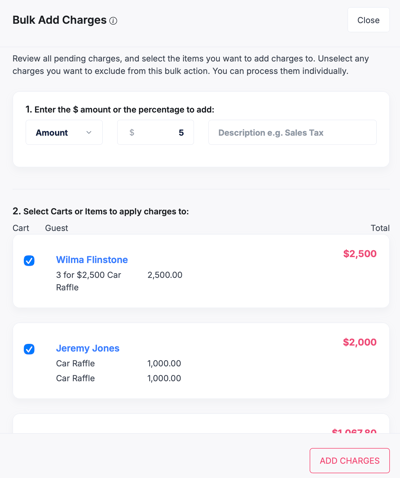
See Add Bulk Charges to Carts for percent-based charges.
Related articles
- Add Shipping Charges to Auction Items or Items Sold at My Event
- Add Bulk Charges to Carts
- Add Items for Sale
- Guest Carts
FAQs
Does BetterUnite calculate sales tax? No. The Sales Tax Applicable? flag only reminds you. You enter the amount.
Can I add tax after the guest has paid? Add tax before you check the cart out. Confirm what happens after payment before answering a customer.
Can I add the same tax rate to many carts? Yes, use Bulk Add Charges and select the carts.
Does the flag change the price guests see at checkout? No.
Need Additional Help?
We're here to assist you in any way we can. Don't hesitate to reach out to support@betterunite.com
Let's go do some good.