-1.png?width=240&height=100&name=Heading%20(2)-1.png)
Notes
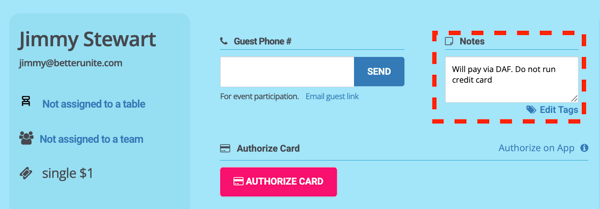
- Purpose: Notes are for internal, free-form details about a specific guest.
- Use Case: Best for one-off or unique information you want the check-in or check-out team to know about that particular guest.
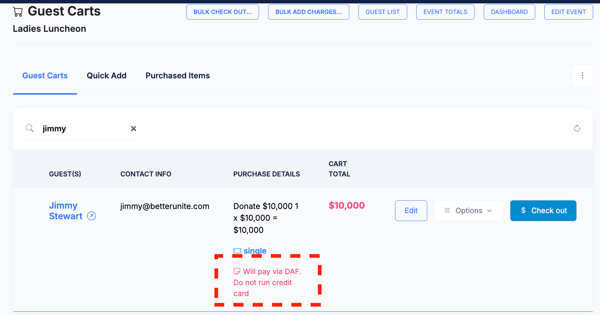
- Examples: checkout reminder like “donor will pay via DAF or check next week" or "do not run credit card."
- Visibility: Notes are visible exclusively to BetterUnite users. While guests cannot see them, all notes are available on guest carts.
Tags
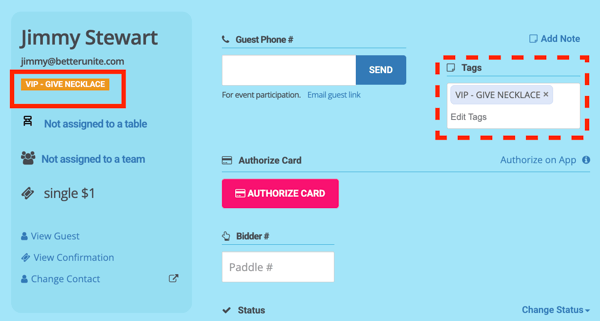
- Purpose: Tags are labels that can be applied to event guests for categorization and quick filtering.
- Use Case: Ideal for segmenting guests into categories that you may want to pull reports on, filter lists by, or apply special handling at check-in.
- Examples: “VIP,” “Sponsor,” “Table Captain - Give Necklace,” “Swag Bag & Shirt.”
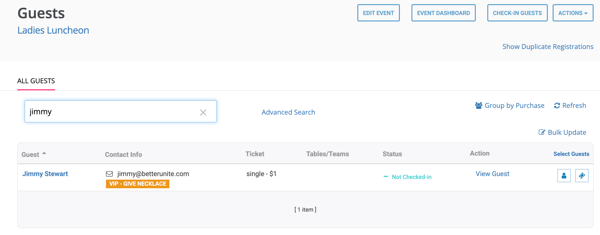
- Visibility: Guest tags are visible exclusively to BetterUnite users. While guests cannot see them, all guest tags are also available to view on the guest list.
- Pro-Tip! You can bulk-tag guests retroactively by following this article: How to Bulk Tag Guests. Or, proactively, when creating your Tickets .
Need Additional Help?
We're here to assist you in any way we can. Don't hesitate to reach out to support@betterunite.com
Let's go do some good