-1.png?width=240&height=100&name=Heading%20(2)-1.png)
For full auction item set up instructions and details see Add Auction Items.
Advanced Options:
See below for detailed explanations.
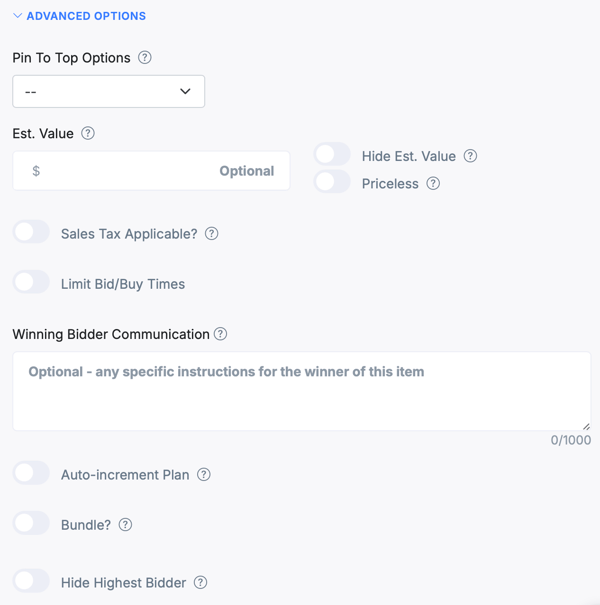
- Pin to Top: Allows you to pin this item to the top of the public page and/or the guest experience bidding page. Typically used to feature items that have no bids to bring attention to them.
- Est.Value: This is a way to entice bidders to go higher. It can effectively indicate the value the winner would be getting for this item as you accept bids. You can choose to show or hide this detail.
- Sales Tax Applicable: If this is checked, when the guest purchases or wins this item, you will see an indication in the guest's cart, and you will be able to add or bulk add the sales tax percentage.
- Limit Bid/Buy Times: This allows you to show and have this item only be biddable for a certain amount of time.
- Winning Bidder Communication: This is an optional email and (if you've opted into Guest Messaging for your event) text that goes out to winning bidders. This email/text is commonly used to describe or provide information on the item's pick-up, delivery, or shipping. It can also provide an organizational representative's limitations, rules, or contact information to the winner of this specific item.
- Auto Increment: Check this box if you's like your auto-increment amounts to be variable based on the current highest bid.
- Bundle: Allows you to select the auction items to be included in this bundle. It will automatically put all the item images and add on the description to the bottom of this item's description. We recommend editing this after you bundle.
- Hide Highest Bidder: You can set this on a per item basis here and on an overall auction basis within Auction Settings.
Need Additional Help?
We're here to assist you in any way we can. Don't hesitate to reach out to support@betterunite.com
Let's go do some good.