-1.png?width=240&height=100&name=Heading%20(2)-1.png)
This article guides you through setting up online funding on BetterUnite, focusing on configuring your payment processors: PayPal and Stripe. It also covers what kind of account each one requires and when your money reaches your bank. View the video below or follow the written step-by-step instructions.
What kind of account you need
Stripe and PayPal work differently on this point, so read it before you start the signup flow.
| Processor | Account you need | Where your money lands |
|---|---|---|
| Stripe | A new Stripe Express account, created for your organization through BetterUnite during signup. A Stripe account you already have cannot be connected as your processor. | Paid out to your bank account automatically, on a rolling schedule set by Stripe. |
| PayPal | A new or existing PayPal business account (you sign in to it during the flow) | Your PayPal balance, which you then transfer to your bank yourself. |
- Stripe requires a new Express account. BetterUnite creates it for you as part of the signup flow, and you manage it from the Stripe Express dashboard button on your Online Funding page. Even if your organization already processes payments through Stripe elsewhere, that account cannot be attached to BetterUnite for donations. For the full walkthrough, see Stripe Sign Up.
- PayPal lets you connect the account you already have. The signup flow hands you off to PayPal, where you sign in to your existing business account and grant BetterUnite permission to process on your behalf. For the full walkthrough, see the PayPal Merchant Onboarding Guide.
- You can set up both. Running both lets you show the PayPal and Venmo buttons on your checkout page while Stripe handles credit cards, so your donors can pay by credit card, Apple Pay, Google Pay, Venmo, or PayPal.
Set up your processor
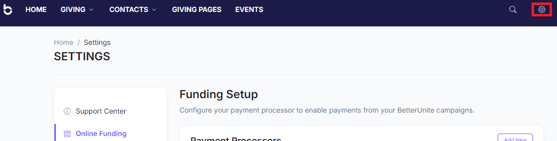
- Navigate to your settings menu by clicking on the gear icon in the top right corner.
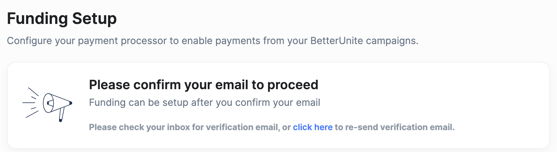
- On the Online Funding tab, you will first be required to confirm your email.
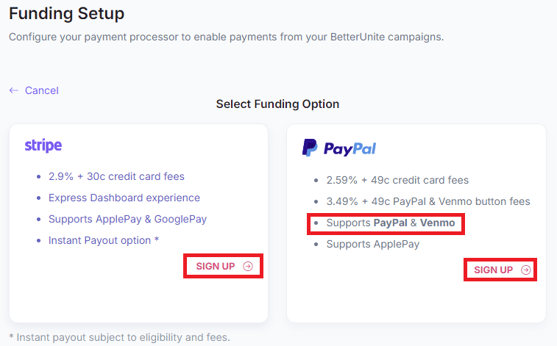
- After confirming your email you will then choose your credit card processor.
- BetterUnite allows you to select either Stripe or PayPal.
- You also have the option to set up both, this flexibility enables you to run on the PayPal and Venmo buttons on your checkout page while using Stripe as your primary credit card processor.
- This gives your donors the option to pay with Credit Card Apple Pay, Google Pay, Venmo, or PayPal.
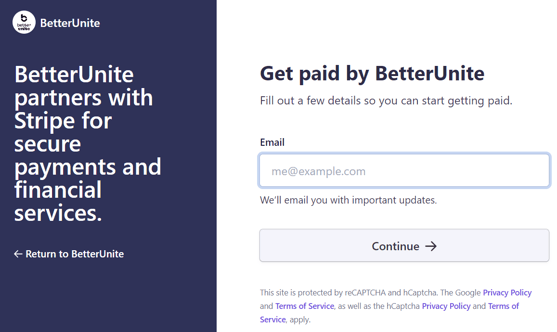
- You'll need to sign up for a new account through the BetterUnite platform.
- Click sign up to begin.
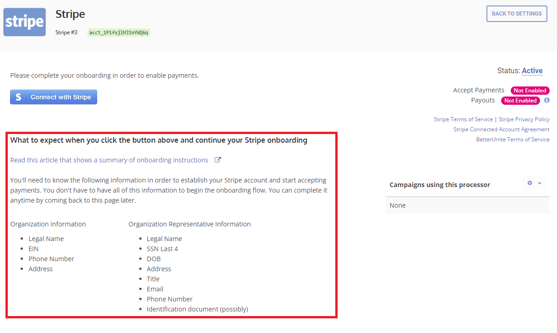
- On the next page, you can view the information you will need to have on hand.
- To complete the process, simply enter all the necessary information in the following flow sequence.
- The process is quick and straightforward, allowing you to get started right away.
Set the processor your campaigns use
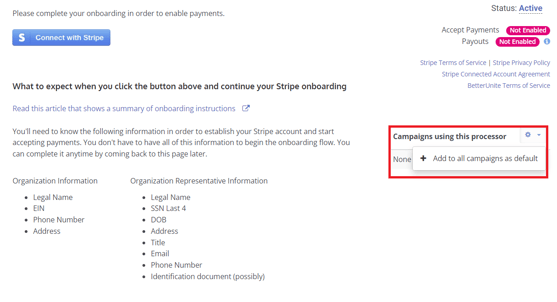
- After entering or confirming your information, go back to the BetterUnite settings and select the gear icon next to campaigns.
- This action will ensure that all campaigns are set to this account as a default processor for accepting donations.
- If you have multiple processor accounts, you can choose which one you'd like to use on a per campaign basis.
When your money reaches your bank
BetterUnite does not hold your donations. Your funds sit with Stripe or PayPal and are released to you under their rules, so the timing below is set by them, not by us.
Stripe payouts
- Stripe pays out to your bank automatically on a daily rolling schedule.
- To see your own schedule, go to Settings, then Online Funding, then open your Stripe account and look at Payout Information. It shows your current schedule along with pending, in transit, and paid amounts and their expected arrival dates.
- For the full explanation, see Stripe Payout Schedules Explained.
PayPal payouts
- PayPal donations are not on a rolling payout schedule. They go into your PayPal balance, usually shortly after the transaction is processed.
- You move the money to your bank yourself from inside PayPal. A standard transfer typically takes 1 to 3 business days, and an instant transfer to an eligible debit card is available for a fee. PayPal
- PayPal can hold funds or apply a reserve on new or unverified accounts until you finish verification and build up history. Those holds are set by PayPal and are managed in your PayPal account.
Related articles
- PayPal Merchant Onboarding Guide, connecting your PayPal account and granting permissions.
- Stripe Payout Schedules Explained, how the delay is calculated and how to shorten it.
Need Additional Help?
We're here to assist you in any way we can. Don't hesitate to reach out to support@betterunite.com
Let's go do some good