-1.png?width=240&height=100&name=Heading%20(2)-1.png)
A pledge payment link supporter a focused way to pay an existing pledge. Instead of showing the campaign's other offers, the simplified payment page display the specific pledge being paid.
The original pledger can pay, or they can share the link with someone else who will make the payment.
Send a payment link for a pledge
- Locate the pledge you want to collect payment for.
- Use View Payment Link to copy and share its payment URL, or Send Payment Instructions to email payment instructions through BetterUnite.
- Ask the recipient to open the link, review the pledge details, and complete checkout.
For more information about accessing these options, see Pledge for an Event.
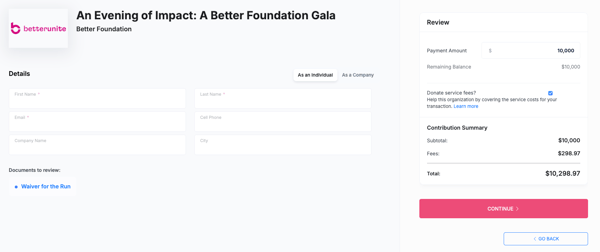
What does the payer see?
The direct pledge payment page shows the pledge amount and associated item, rather than the campaign's other items and offers. The payer reviews the details, enters their payment information, and competes checkout.
This article describes a direct pledge payment link. Adding a pledge to a guest cart is a separate collection workflow; a guest cart may already contain other items. For that workflow, see Pledge Payment Charge to Guest Cart.
Can someone other than the original pledger pay?
Yes. The pledge payment link is a public URL, so anyone with the link can use it to pay the pledge.
The person who completes checkout is recorded as the payer. The original pledger remains associated with the pledge. This allows another person to contribute toward the commitment without replacing the original pledger.
Share the link only with intended payers, since anyone who receives it can open the payment page.
Can the payer change the payment amount?
Activity pledge
For an activity pledge, the payer cannot change the displayed pledge amount on the payment page. If the amount needs correcting, an administrator should review the pledge and activity information before sending updated payment instructions.
For details about collecting activity-based pledges through guest carts, see How to Collect Payment for Peer-to-Peer Pledges.
Sponsorship or donation pledges with partial payments
The payment page can allow a payer to enter less than the total pledge amount for a sponsorship or donation pledge. This is usefil when more than one person is contributing toward the same pledge.
For example, two payers could each contribute $5,000 toward a $10,000 sponsorship pledge.
Before requesting another contribution, review the pledge's applied payments and outstanding balance so each payer knows how much remains to be paid.
How do I review payments against the pledge?
Open the pledge record to review its pledged amount, amount received, and applied payments. Use the information to track progress toward the commitment and follow up on any remaining balance.
If you need to record a payment received outside BetterUnite, use the applicable offline- payment workflow rather than asking the supporter to pay again online.
Frequently asked questions?
Why don't I see the campaign's other offers?
The simplified pledge payment page is designed to focus on the pledge being paid. It is not the campaign's general shopping or donation page.
Is this the same as splitting a guest cart payment?
No. A direct pledge link collects payment toward an existing pledge. The separate Split Payment workflow processes part of a guest cart total and creates a pledge for the remaining balance.
What if the payment amount looks incorrect?
Contact the organization before completing checkout. An administrator can review the pledge, activity totals where applicable, and payment already applied.
Need Additional Help?
We’re here to assist you in any way we can. Don’t hesitate to reach out to support@betterunite.com
Let’s go do some good.